It is 9:12 a.m. A couple wants a revised budget before lunch, a venue has changed load-in timing, and two vendors are still waiting on a final timeline. In that kind of workday, generic advice is useless. Wedding planner resources need to reduce handoffs, cut duplicate admin, and keep service consistent even when plans change by the hour.
Client demand is still there, but the buying pattern has shifted. Couples now book planners across different service levels, from day-of support to full planning, so the same business often has to deliver both a high-touch experience and a leaner, clearly bounded offer. That puts pressure on your systems. Intake, contracts, design collaboration, timeline building, payment collection, and day-of execution all need to connect cleanly or the gaps show fast.
The tools in this guide are organized the way planners work. Client Management. Design and Logistics. Lead Generation and Sales Visibility. Professional Development. On-site Execution.
That structure matters for ROI. A good tool is not just a feature set. It should solve a specific operational problem, fit into the rest of your process, and earn its place through saved hours, fewer errors, faster approvals, or a better close rate.
These are the resources I would put in front of a working planner who wants a stack they can put to use, along with a clear way to integrate each one into the workflow.
Client Management
1. Aisle Planner

Aisle Planner is one of the cleanest answers to the “too many tabs” problem. If you want one system for proposals, contracts, invoices, timelines, guest lists, seating, design boards, and client communication, this is the obvious shortlist tool.
Its biggest strength is focus. It was built for weddings, so you don't spend your first month bending a generic CRM into planner-shaped workflows. That saves mental energy, especially when you're managing multiple active events at different stages.
Where it works best
Aisle Planner is strongest for planners who want a central operating system, not just a booking tool. I like it most for teams that need one source of truth for the client, associate planner, and assistant.
The trade-off is cost structure. As your active project count grows, your subscription usually grows with it. That's fair if the platform is replacing several tools. It's less attractive if you only need sales and light project tracking.
Practical rule: If you're still storing contracts in one app, budgets in spreadsheets, and seating in a separate design tool, Aisle Planner can simplify your week fast.
- Best use case: Full-service planners and growing firms
- Strongest feature set: Budgets, timelines, design boards, portals, and event websites under one login
- Watch-out: The Sales Essentials tier leaves out project management, so check the plan details before committing
How to integrate
Onboard every new client inside Aisle Planner from day one. Give them portal access immediately, then keep all core documents, checklists, and budget revisions in-platform. That sets expectations early. Clients learn where to look, and your team stops chasing the “latest version” of everything.
2. HoneyBook

HoneyBook is what I recommend when a planner cares as much about booking flow as they do about back-end organization. It feels polished on the client side, which matters when you're trying to convert an inquiry before they ghost or comparison-shop you into silence.
The strongest part of HoneyBook is its sales experience. Smart Files let you package a proposal, contract, and invoice together, which removes a lot of booking friction. Clients don't have to open three separate documents and wonder what to do first.
The real trade-off
HoneyBook handles lead capture, scheduling, payments, and automations well, but some of the better workflow features sit in higher tiers. If you want more advanced automation or team functionality, expect to pay for it.
That said, unlimited clients and projects across plans makes it attractive for high-volume planners, especially coordinators handling many shorter engagements.
A good booking system doesn't just look nice. It shortens the gap between “we love you” and signed contract.
How to integrate
Use Smart Files as your default first-booking document. Send one file that includes the proposal, contract, and initial invoice. Then connect your calendar and email so consult scheduling and follow-up stay in one place. HoneyBook works best when you lean into the full clientflow instead of using it as a digital invoice folder.
3. Planning Pod

Planning Pod sits in an interesting lane. It's useful for wedding planners, but it really shines when the planner is also closely tied to venue operations, catering coordination, or broader event management.
That makes it a smart option for planners who wear two hats. If you're dealing with bookings, floor plans, guest management, internal calendars, and package templates across multiple stakeholders, Planning Pod can reduce tool sprawl.
Best fit for venue-heavy workflows
This isn't the first platform I'd choose for a solo planner who wants a minimal setup. It has a wide feature set, and wide feature sets usually come with a learning curve.
But if you routinely coordinate with venue managers, F&B teams, or in-house operations staff, the shared environment is a practical advantage. The floor plan and guest management tools help everyone work from the same event record, which cuts version confusion.
- Choose it if: You manage logistics across venue, catering, and planning
- Skip it if: You want the fastest possible setup and don't need operational depth
- Expect: A broader event platform rather than a boutique wedding-only feel
How to integrate
Use Planning Pod as the collaboration layer with venues. Start with floor plans, seating, and guest management in the shared workspace, then keep operations notes tied to the event file. It's especially useful when multiple departments need visibility without constant email forwarding.
Design and Logistics
4. Timeline Genius

Timeline Genius earns its place when the wedding day schedule has a lot of handoffs and very little room for interpretation. A general planning platform can hold timing notes. It usually falls short when you need polished, role-specific timelines that each vendor can read in seconds.
That is a key value here. You build one master schedule, then create filtered versions for the photographer, catering team, transportation lead, venue, and couple without rebuilding the document five times.
Where it earns its keep
I reach for a dedicated timeline tool on weddings with split locations, large vendor teams, cultural ceremony elements, or tight room flips. In those events, timeline clarity protects margin. Fewer clarification calls. Fewer missed cues. Less time spent correcting version-control problems the week of the wedding.
Timeline Genius is especially useful if your process depends on sending different levels of detail to different people. The couple needs a readable high-level flow. The planner team needs setup, transition, and contingency notes. Vendors need the parts that affect their arrival, setup, service window, and departure.
Send each partner the information tied to their job. It reduces noise and makes critical timing easier to spot.
The trade-off is simple. If your weddings are small and your timelines stay relatively straightforward, a broader planning platform may be enough. If your events involve layered logistics, this tool saves real production time.
How to integrate
Build your master timeline after the venue walkthrough and initial vendor confirmations. Then create filtered versions by stakeholder group and send them on a fixed schedule: first draft internally, revised version to vendors, final version after the last planning call.
Use it as the timeline layer in your broader workflow, not as a replacement for your CRM. Client communication can live in your planning platform. Day-of timing belongs here. That division keeps updates cleaner and makes it easier for your team to know which document is the operational source of truth.
5. Cvent Event Diagramming

Cvent Event Diagramming, formerly Social Tables, is the path of least resistance when a venue already uses it. That alone gives it value. In event work, the best tool is often the one the room itself already recognizes.
It's strong for floor plans, seating assignments, table numbering, and collaborative layout work. If a hotel, ballroom, or major venue has an existing diagram in the platform, you're starting with measured space instead of rough estimates and marked-up PDFs.
Where it earns its keep
This is the tool I'd prioritize when rentals, spacing, power access, and guest flow all depend on the layout being exact. It's also useful when your venue contact wants to review changes in a system they already know.
The downside is predictable. If you're a smaller operation, the wider Cvent ecosystem can feel bigger than you need. Some advanced functionality also sits behind paid tiers or training.
- Best for: Venue collaboration and accurate layouts
- Less ideal for: Planners who rarely need complex diagrams
- Operational upside: Fewer layout mistakes, fewer rental surprises, cleaner communication with venue teams
How to integrate
Ask the venue for its existing diagram link as soon as you're contracted. Work inside that pre-measured file instead of recreating the room. That one habit can prevent layout mistakes that ripple into décor counts, catering spacing, and traffic bottlenecks.
6. Prismm

Prismm, formerly Allseated, is for planners who sell with visuals. Some clients can approve a design from a PDF and a mood board. Others need to see the room, feel scale, and understand sightlines before they'll commit.
Prismm helps with that. Its digital twins and 3D planning tools make venue walk-throughs and design approvals easier, especially with remote clients or destination work.
Strong for remote decision-making
This category is growing fast. The virtual reality wedding planning market is projected to grow from USD 261.5 million in 2024 to USD 4,917.6 million by 2034, with a 34.1% CAGR, according to virtual reality wedding planners market projections. That doesn't mean every planner needs VR. It does mean immersive visualization is becoming a serious workflow tool, not a novelty.
Prismm is most useful when design approval is slow because the client can't visualize the room. It's less useful if your events are straightforward and your clients are making quick decisions from standard layouts.
A 3D walkthrough can resolve design hesitation faster than six email threads with annotated screenshots.
How to integrate
Use Prismm early in venue selection and concept approval. Walk clients through multiple spaces remotely before locking in site visits. Once the venue is booked, use the same environment to review layouts, table placement, and focal design moments with fewer revisions.
Lead Generation and Sales Visibility
7. WeddingPro

WeddingPro gives planners visibility on The Knot and WeddingWire, which still matters because couples search where they already compare vendors. It's not a magic pipeline, but it can be a useful storefront if your market is active and your profile is strong.
The value here is reach, reviews, and response management in one place. The app and centralized inbox make it easier to respond fast, and speed matters in wedding sales.
What works and what doesn't
WeddingPro works best when you treat it like a managed channel, not a passive listing. Good photos, clear package positioning, and steady review collection matter more than being present.
The weak point is predictability. Pricing varies by market and category, and planner ROI can differ a lot based on geography, competition, and your niche. I wouldn't build an entire lead strategy around it. I would consider it one visibility layer.
- Use it for: Reach, social proof, and a steady review pipeline
- Don't expect: Instant-fit leads without active profile management
- Best habit: Respond quickly and request reviews promptly after the event
How to integrate
The moment a WeddingPro lead books, tag them in your system so you can track actual close quality later. Then send a review request through the platform right after the wedding while satisfaction is still fresh. If you don't actively build reviews, the listing loses momentum.
8. Rock Paper Coin

A familiar planning problem looks like this: the client is ready to book, the proposal is approved, and your payment process still feels harder than it should. Rock Paper Coin solves that specific bottleneck well.
RPC fits planners who already have their planning workflow handled elsewhere and want a cleaner booking and payment layer. Its strongest use case is the front half of the client relationship, before production details get complex. Proposals, contracts, invoices, and payment collection live in one place, which cuts down on the handoff errors that happen when those steps are spread across separate tools.
Why it stands out
What I like most about RPC is role clarity. It does not try to be your full operating system. It handles the commercial side of the job cleanly, and for many firms that is the better trade-off.
The fee structure is easier to explain to clients and easier to model internally than some larger platforms. That matters if you offer multiple planning packages, custom partial-planning scopes, or event management add-ons where deposit timing and installment schedules need to stay consistent. It also works well for teams that want polished client-facing paperwork without adopting a heavier CRM they will only use halfway.
How to integrate
Use RPC as your booking-to-cash tool, not your master planning hub. Build your package templates, payment schedules, and contract terms there. Once a client signs and pays, push them into your main planning system for timelines, design decisions, vendor coordination, and production tracking.
That division of labor keeps your workflow cleaner. RPC handles getting the client booked and paid. Your planning platform handles delivering the event.
Professional Development
9. WIPA

WIPA is one of the few wedding planner resources that can improve both your standards and your referral network at the same time. Software helps you execute. Associations help you stay credible and connected.
For planners who want stronger venue relationships and more trusted vendor referrals, local chapter involvement is usually where the payoff sits. Not the membership badge by itself. The actual meetings, conversations, and committee work.
Why this still matters
This industry is relationship-heavy, and referrals still move business. WIPA helps when you want to build a circle of florists, photographers, venues, and entertainment partners who know how you work and trust your process.
There is a bar to entry. Membership requires active business status and $1M liability insurance. That's a good filter if you want to network with established professionals, but newer planners should know it's not a casual sign-up.
The strongest vendor network usually isn't the largest one. It's the one that knows your standards well enough to refer you without hesitation.
How to integrate
Join your local chapter and show up consistently. Attending once won't do much. Repeated visibility does. I'd also volunteer for something small if possible, because shared work builds stronger relationships than business-card swaps.
10. Wedding MBA

Wedding MBA is where planners go when they want concentrated education, broad vendor exposure, and a fast read on where the industry is moving. Conferences can be expensive in both travel and time, so the test is simple. Do you come back with ideas you can use?
Wedding MBA usually passes that test if you attend with a plan. The event packs education, demos, and networking into a short window, which makes it efficient for planners who don't have time to source all of that separately.
How to get real ROI from it
Walking the floor without a strategy is the fastest way to waste the trip. The conference is large enough that random wandering turns into noise.
In the United States, the wedding planner industry reached $1.5 billion in revenue by 2025 and 21,714 businesses, according to IBISWorld wedding planner industry data. In a field this crowded, staying current on operations, positioning, and tools isn't optional. It's how you avoid looking stale.
- Book demos in advance: Don't rely on catching vendors when the booth is busy
- Prioritize seminars: Pick sessions tied to a real business problem you need to solve
- Follow up fast: The value drops if your notes sit untouched for a month
How to integrate
Before you go, choose a single business goal. Better booking flow, improved margins, stronger design delivery, or new referral partners. Then build your schedule around that goal and avoid anything that doesn't support it.
On-site Execution
11. The Day-Of Emergency and Experience Kit
Five minutes before guest arrival, a bridesmaid splits a zipper, the groom asks for a stain pen, and the catering captain flags insects hovering near the buffet. The planner who handles those issues quietly protects more than the schedule. They protect the client experience in real time.
This kit earns its place because it solves small problems before they turn into delays, photo issues, or guest complaints. Software keeps the plan organized. A well-built on-site kit keeps the event intact once the plan meets weather, people, and real venue conditions.
What belongs in it
Build the kit around three categories: personal emergency items, wardrobe and beauty fixes, and guest comfort support. Core supplies usually include a first-aid pouch, stain remover, fashion tape, safety pins, sewing basics, chargers, tissues, hand sanitizer, pain relievers, mints, sunscreen, and blister care.
The stronger version of this kit covers the issues planners only learn after a few hard wedding days. Extra earring backs. Hem tape. Lint rollers. Clear umbrellas. A phone power bank that maintains its charge. Copies of the timeline, family shot list, and vendor contacts in print, not just on a phone.
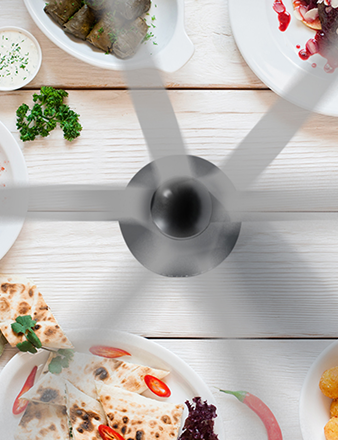
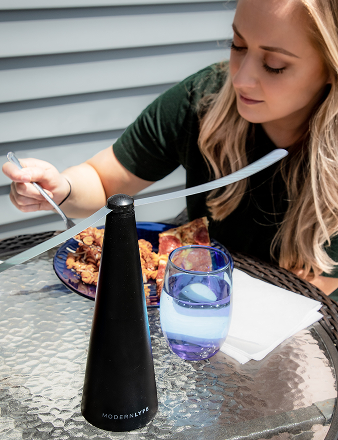
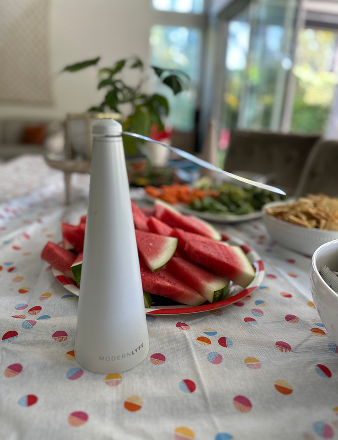
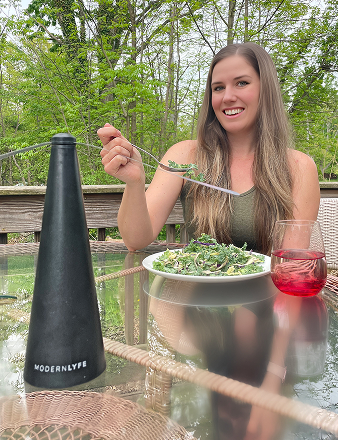
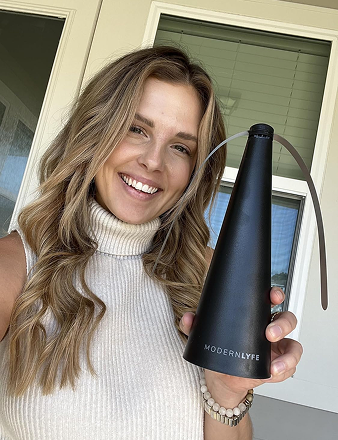
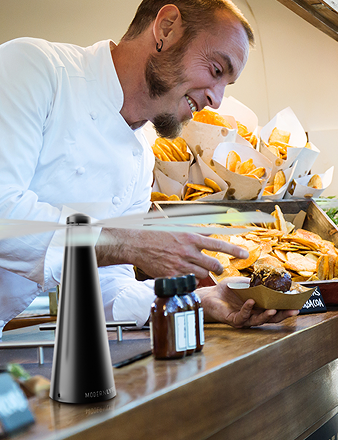
Outdoor and semi-outdoor events need one more layer of preparation. Pest management matters most around food service and guest tables, but aerosol sprays and strong repellents can create their own problems for catering, florals, and guest comfort. Battery-operated table fly fans are a practical fix for buffets, dessert displays, and outdoor dining setups where you need insect control without changing the look of the event.
Modern Lyfe Fly Fans fit that use case well because they are easy to place during setup and do not add visual clutter to the table.
How to integrate
Pack this as a working system, not a catch-all bag. Use labeled compartments in a rolling case so an assistant can find items fast without asking you where everything is. Restock from a standard checklist after every event, then review the list seasonally because summer weddings, tented receptions, and ballroom events need different supplies.
For teams, assign ownership before load-in. One person covers personal and wardrobe fixes. Another monitors guest-facing comfort items near the ceremony and dinner areas. If outdoor dining is part of the plan, place fly fans during catering setup, before food is out and before guests notice a problem. That is the trade-off with this kit. It takes discipline to maintain, but it saves time, protects the atmosphere, and reinforces your value in the moments clients remember most.
Top 11 Wedding Planner Resources Comparison
A comparison table is only useful if it helps you choose the next tool in your workflow, not just skim features. I group these resources by the job they do best: client management, design and logistics, lead generation, professional development, and on-site execution. The last column focuses on the practical question that matters most in a planning business: how to integrate each one without creating more admin work.
| Tool | Core Features ✨ | UX / Quality ★ | Value & Pricing 💰 | Target Audience 👥 | Standout / How it helps Modern Lyfe 🏆 |
|---|---|---|---|---|---|
| Aisle Planner | Timelines, checklists, budgets, seating and client portals ✨ | ★★★★☆ Purpose-built, polished | 💰 Tiered by active projects, predictable tiers | 👥 Wedding planners with many simultaneous events | 🏆 All-in-one wedding toolkit. Works well as the central source of truth for planning, documents, and client-facing updates. How to integrate: use it as the main project hub, then keep all timelines, budget revisions, and seating changes there instead of splitting them across spreadsheets and email threads. |
| HoneyBook | Proposals, contracts, payments, scheduler and AI tools ✨ | ★★★★★ Clean, client-friendly UX | 💰 Unlimited projects, payment fees apply on transactions | 👥 Creatives and small-team planners who prioritize client experience | 🏆 Smart Files keeps booking steps in one place and can shorten the gap between inquiry and signed contract. How to integrate: connect lead replies, proposal delivery, contract signing, and first payment into a single booking sequence so prospects do not stall between steps. |
| Planning Pod | CRM, floor plans, registration, ticketing and ops dashboards ✨ | ★★★★☆ Broad feature set, steeper learning curve | 💰 Quote-based, all-in-one setup can reduce tool sprawl | 👥 Planners who also manage venues or catering logistics | 🏆 Strong fit for teams balancing planning with venue coordination and event operations. How to integrate: assign it to multi-stakeholder events where registrations, layouts, staffing, and logistics need to live together, rather than forcing a wedding-only platform to do venue work. |
| Timeline Genius | AI timeline generator, vendor-specific timelines and reminders ✨ | ★★★★☆ Time-saving, focused tool | 💰 Subscription for specialized functionality | 👥 Planners who need efficient, detailed timelines | 🏆 Cuts timeline drafting time and makes vendor versions easier to tailor. How to integrate: build the master timeline here after key vendor confirmations, then export role-specific versions for photo, catering, entertainment, and venue teams. |
| Cvent Event Diagramming (Social Tables) | 2D/3D diagrams, seating, venue library and collaboration ✨ | ★★★★★ Industry standard for diagramming | 💰 Free entry tier, paid for advanced features and training | 👥 Venues, hotels and planners working with large venues | 🏆 Reliable venue diagrams help reduce layout mistakes before load-in. How to integrate: use it when a property already works in Cvent or when banquet teams need precise diagrams they will recognize and trust. |
| Prismm (Allseated) | Fast 2D to 3D plans, photoreal digital twins and walkthroughs ✨ | ★★★★★ High-impact visualization | 💰 Sales-assisted pricing, visualization-focused | 👥 Planners selling designs and remote site tours | 🏆 Visual mockups help clients approve layouts and design decisions faster. How to integrate: bring it in during proposal and design presentation stages, especially for clients who struggle to read flat floor plans or are planning from out of town. |
| WeddingPro (The Knot + WeddingWire) | Dual marketplace exposure, lead inbox and reviews ✨ | ★★★★☆ Massive consumer reach, mixed ROI | 💰 Market and category quote pricing, high visibility | 👥 Vendors seeking leads and reputation growth | 🏆 Large consumer reach can support review growth and inquiry volume, but performance varies by market. How to integrate: track lead source, close rate, and average booking value by listing tier so you can judge it by profit, not visibility alone. |
| Rock Paper Coin (RPC) | Branded proposals, contracts, invoicing and fee passing ✨ | ★★★★☆ Simple, clean payments UX | 💰 Transparent, affordable, free invoicing option | 👥 Planners wanting a lightweight payments tool | 🏆 Clear payment workflow works well for deposits, installment schedules, and payout clarity. How to integrate: use it if your current system handles planning well but creates friction around billing, signatures, or collecting money on time. |
| WIPA | Local chapters, education, networking and credibility ✨ | ★★★★☆ Professional association benefits | 💰 Annual dues plus $1M liability insurance requirement | 👥 Established wedding pros seeking referrals | 🏆 Chapter relationships can lead to stronger vendor referrals and better industry standards. How to integrate: treat membership like a referral channel, not a badge. Attend regularly, follow up, and build working relationships with venues, florists, photographers, and DJs in your market. |
| Wedding MBA (Conference) | Seminars, expo floor, vendor demos and networking ✨ | ★★★★☆ Dense, actionable education | 💰 Ticket plus travel, high ROI if planned well | 👥 Pros seeking education, trends and vendor evaluations | 🏆 Efficient way to compare tools, hear operator-level advice, and vet vendors in person. How to integrate: go in with a shortlist of systems you need to replace or adopt, book demos ahead of time, and leave with a 90-day implementation plan. |
| The Day-Of Emergency & Experience Kit | Med, wardrobe and comfort station plus Modern Lyfe fly fans ✨ | ★★★★★ Directly improves guest comfort and food hygiene | 💰 One-time kit investment plus restock costs | 👥 Day-of planners, caterers and event staff | 🏆 Covers the small operational failures clients notice first, including outdoor dining pest control with Modern Lyfe fly fans. How to integrate: pack the kit by use case, assign ownership on event day, and restock from a post-event checklist so it stays deployment-ready. |
Build Your Stack, Build Your Brand
A planner's stack shows up long before the wedding day does. It shows up in how fast leads get a reply, how clearly proposals are presented, how often timelines need rework, and how calmly the team handles pressure on site. Clients read all of that as brand quality.
Build your stack by workflow category, then by bottleneck. Client Management tools should shorten response time, reduce admin drag, and make approvals easier. Design and Logistics tools should cut revision rounds and tighten venue coordination. Professional Development should improve judgment, standards, and referral quality. That structure keeps software decisions tied to ROI instead of impulse buys.
I usually recommend starting with the point where work stalls. Slow conversions call for a stronger booking and payment process, often through HoneyBook or Rock Paper Coin. Scattered project information usually points to Aisle Planner or Planning Pod. Constant timeline edits usually justify Timeline Genius. Venue communication problems often improve once floor plans and guest flow are handled inside Cvent Event Diagramming, Prismm, or both. The right answer depends on the friction you are trying to remove.
Training matters as much as selection.
A good platform used halfway creates almost as much confusion as no platform at all. Set one owner for implementation, document the process your team will follow, and give the tool a real adoption window before adding another layer. That is how a stack starts strengthening the business instead of becoming another tab everyone ignores.
Professional development belongs in the same conversation. WIPA and Wedding MBA do not manage leads or build timelines, but they sharpen decision-making and improve the vendor relationships that protect margins and execution quality. Those returns are less obvious on a dashboard, yet they show up in better handoffs, stronger referrals, and fewer avoidable problems.
The on-site kit belongs in your stack too because clients judge execution in real time. They may never know which CRM you use. They will notice a missing stain remover, a broken bustle fix, dead batteries, or an outdoor dinner service that becomes uncomfortable. Small operational details shape guest experience fast, especially outside. Quiet, battery-operated fly fans are one example. Used in buffet lines or dining areas, they help support food presentation, hygiene, and guest comfort in conditions that are harder to control.
For planners handling outdoor weddings, MODERN LYFE is one practical brand to consider as part of that event-day setup, as noted earlier.
If you are rebuilding for 2026, keep the rollout tight. Choose one problem, install one tool that solves it, write the process around it, and measure whether it saves time, reduces mistakes, or improves conversion. Strong planning brands are rarely built on the biggest tech stack. They are built on the right stack, used consistently.