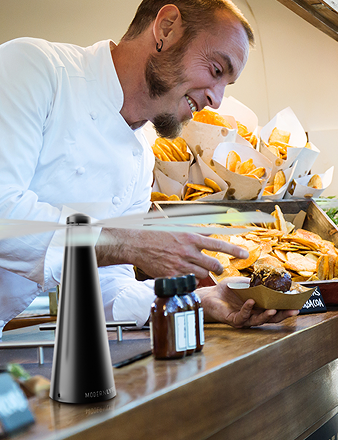
You're on the clock, the buffet is half dressed, and a guest is already asking when the patio tables will be ready. That's the moment a quick installation guide earns its keep, because the difference between a clean service and a messy one usually comes down to whether small equipment is placed and checked before the room fills up.
A fly fan looks simple, but in catering work simple gear still needs a clean setup path. I've seen it on brunch patios, wedding head tables, and backyard cookouts, the people who win the hour are the ones who treat setup like a repeatable routine, not a guess. That's why this guide focuses on fit checks, placement, runtime, and the world issues that matter once the plates start moving.

If you've ever compared an orderly appliance walkthrough like Allied Drinks Systems' coffee machine installation guide to a rushed handoff, you already know the value of clear setup steps. The same logic applies here, especially for restaurant managers, hotel coordinators, professional caterers, and homeowners who want the fan working before service starts. For a broader product overview, Modern Lyfe's fly fan page gives the basic context.
Get from unopened box to working fan in the same window it takes to set the table.
Setting the Scene Before the First Setup
A patio host is smoothing linen over a round table while the first lunch guests are still parking. A banquet captain is checking centerpieces, water glasses, and service trays while someone asks whether the outdoor line is ready. In that kind of minute-by-minute setup, a quick installation guide needs to do one thing well, get a fly fan into service without stealing time from the rest of the room.
That's why this format matters for restaurant managers, hotel event coordinators, professional caterers, and homeowners alike. The fan itself is meant to be battery-operated, quiet, and visually unobtrusive, so it should disappear into the table layout instead of dominating it. The installation path should feel just as calm, with clear placement, a fast check, and no extra hardware drama.
A good quick-start process also fits the way operators already work. Major technical-writing guidance says installation documentation should be tested by someone unfamiliar with the product, updated regularly, and written to reduce support calls and mistakes, which is exactly the right standard for a service item that gets moved from event to event ClickHelp installation guide guidance.
A useful mental model is simple, if the guide helps you set the table and the fan in one pass, it's doing its job. If it forces a second round of adjustments after guests arrive, it's not.
Prep and Pre-Install Fit Checks
The quickest installs are usually the ones that start with a pause. Before touching the hardware, check the surface, the space, and the room around it, because most problems show up before the fan ever powers on. A table that looks fine from across the room can still wobble, crowd place settings, or put the airflow in the wrong place.
Start with the table, not the fan
Look at the exact spot where the base will sit. The surface should be level, stable, and clean, and it should give the base enough contact that the fan doesn't shimmy when guests set down plates or when service staff brush past. General hardware guidance keeps repeating the same warning, check for level, square, clean, and compatible surfaces first, then allow the unit to settle before relying on it in service hardware surface guidance.
Then look at the surrounding layout. The fan should fit without crowding stemware, bread baskets, condiment trays, or a centerpiece, and it should never sit where airflow can reach candles or chafing fuel. That isn't overcautious, it's just the difference between a helpful table tool and a nuisance.
Unbox without losing the small parts
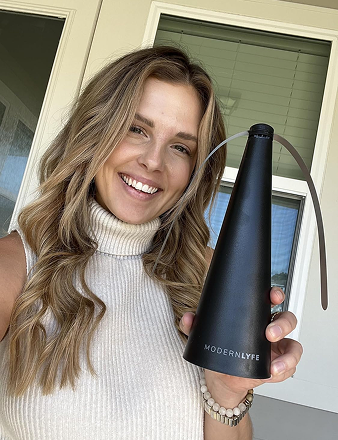
Lay everything on a clean tray or prep mat before you start. For the Modern Lyfe setup, that means the fan unit, base, charging cable, and the small parts card should all be visible before assembly begins. Once a cable or card disappears into a linen pile or a tote full of service tools, setup slows down for no good reason.
A simple fit check also answers the bigger question, will this even work in the space you planned? That's the overlooked step most install guides skip, but it matters on round tables, linen-covered tables, patio settings, and temporary stations where clearance is tight. If you want a technical reference for sizing and configuration details, use the technical specifications page as the facts check before service day.
A thirty-second fit check saves a lot more time than a mid-service relocation.

Mounting and Placement by Setting
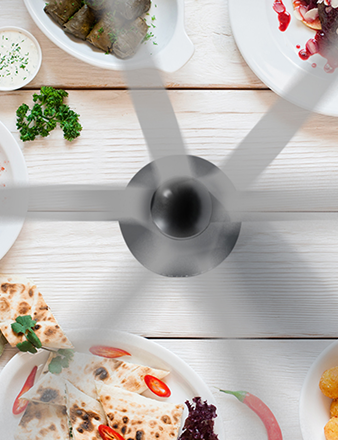
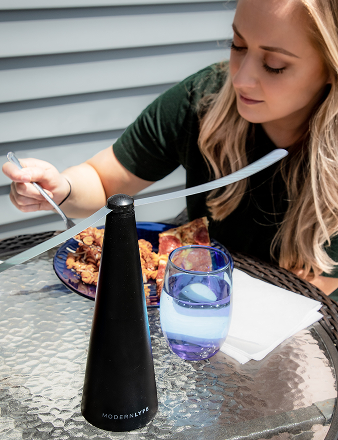
At restaurant tables, I place the fan near the table's midpoint, but just outside the centerpiece zone. That keeps the airflow useful without flattening napkins or crowding the visual line of the meal. The goal isn't to make the fan obvious, it's to put the air where it helps plates and keeps flies moving away from the setting.
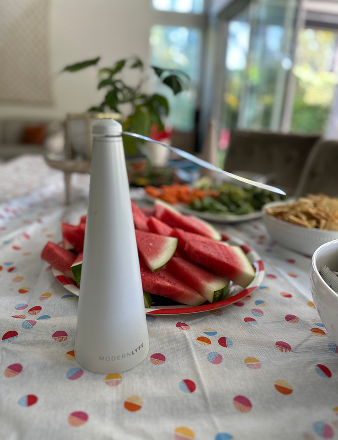
Buffet lines need a different touch. The fan belongs behind the food line, not over it, so the breeze moves across the service edge without blowing directly across uncovered dishes. Keep the height consistent with the rest of the line, especially when chafing dishes are already creating visual clutter, and leave enough spacing between stations that one unit doesn't fight another.
Outdoor receptions and casual backyard service
Outside, I check wind direction first. If the fan sits in a breeze line, the airflow gets pushed off target, so position it where it still protects the service area without fighting the weather. On stone patios, umbrella tables, and uneven folding setups, the base needs a stable landing spot, and the control panel shouldn't bake in direct sun all afternoon.
Food trucks and outdoor markets have their own quirks. Vibrations from foot traffic, generators, and doors opening all shift the fan over time, so the base should be seated firmly and kept clear of awning drips or condensation. If you've got a service lane with tight movement, the safest placement is the one that doesn't get knocked by bags, carts, or elbows.
I've watched teams try to make one placement rule work everywhere, and it doesn't. A wedding table, a brunch buffet, and a cookout line all need the same basic logic, but the fan has to follow the room, not the other way around.
Rule of thumb: airflow should move flies away from the food, not toward the guests.
Battery, Controls, and Runtime per Service
The first thing I tell staff is not to trust the charge that's already on the unit. The fan ships with a partial charge for shelf life, so top it up fully before the first service instead of assuming it's ready straight out of the box. That small habit prevents the classic mistake where a unit looks fine during setup and fades halfway through the event.
The controls should be simple enough to read in one glance. Turn the unit on, cycle through the available speeds, and, if your model includes a lock function, use it once the setting is right so nobody changes it by accident during service. Keep the process plain and repeatable, because the person adjusting it at 7 p.m. is often not the person who unpacked it at 3 p.m.
The practical question is runtime, not battery theory. An event lead needs to know what one charge can handle during a dinner service, a four-hour reception, or a long brunch shift, and the answer depends on how hard the fan is working.
| Speed Setting | Typical Use Case | Approx. Runtime per Charge |
|---|---|---|
| Low | Quiet table service during a short meal period | Longer runtime, suitable for slower service windows |
| Medium | Mixed indoor or covered outdoor service with steady guest traffic | Balanced runtime for most event shifts |
| High | Hot patios, windy edges, or heavier fly pressure | Shorter runtime when maximum airflow matters |
For charging habits, keep it simple. Charge between events, don't run the battery all the way to zero, and store the unit at room temperature so it's ready when the next service rolls around. If your operation cycles through older batteries or retired units, Reworx Recycling's page on choosing a battery recycling vendor is a practical reference for handling end-of-life gear responsibly.
If you need a deeper maintenance reference, the battery replacement guide is the place to check the service side of the equation.
Safety Tips and Common Setup Mistakes

A fly fan is service equipment, so it should be treated like part of the table plan, not a decoration you tuck wherever it fits. The base needs a clear footprint, especially when linen tablecloths can bunch under it and create a wobble point. Keep the airflow away from candles, chafing fuel, and open drink stations where splash is likely, because those are the spots where a good setup becomes a bad one fast.
The mistakes that quietly cause trouble
One common miss is assuming the included charge is full. It usually isn't, and that leads to weak runtime right when the room gets busy. The better default is to top off the battery before the first use and then make charging part of the event closeout.
Another mistake is pushing the fan too close to the edge of the table. Guests bump edges, staff brush past them, and that's how a useful unit turns into a wobble or a fall. Set it where the table can absorb normal traffic without the fan becoming a reach hazard.
Direct rain is another hard stop. If the fan is meant for outdoor use, that still doesn't mean it should sit in open weather, so keep it under cover when conditions turn wet. The same goes for blocked vents, if décor, bags, or stacked service items crowd the intake, airflow drops and the fan feels weaker than it should.
General installation guidance keeps coming back to the same core rule, check the surface first and let the unit settle before relying on it in service surface and compatibility guidance. That lines up with what I see on event floors, the simplest setups fail when the base, surface, or surroundings were never checked properly.
Treat the fan like a piece of service equipment, not a decorative object, and it'll quietly do its job all night.
Troubleshooting, Maintenance, and Warranty Registration

When the fan won't turn on, check the charge level first and make sure the power button is being held the way the model expects. If it runs but airflow feels weak, clean the vents and confirm nothing is blocking the intake. If it wobbles, re-seat the base on a flatter part of the table. If the controls feel unresponsive, let the battery rest, then reset or re-pair the unit if that function is available.
Basic maintenance is just as plain. Wipe the base and grille with a dry cloth between events, skip harsh cleaners, and keep the charging port dry. During the off-season, store the fan indoors so it doesn't sit through weather it was never meant to absorb.
Warranty registration should be a quick clipboard task, not a project. Modern Lyfe's customer service channels can handle registration, and it's smart to do it soon after setup so the unit is documented if anything ever goes wrong.
If you're building out a cleaner event setup, MODERN LYFE offers battery-operated fly fans designed for tables, patios, and buffet lines without crowding the service look. Visit MODERN LYFE to review the product options and keep your next setup calm, practical, and ready before the first guest sits down.