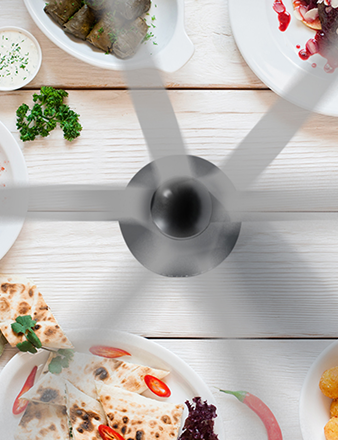
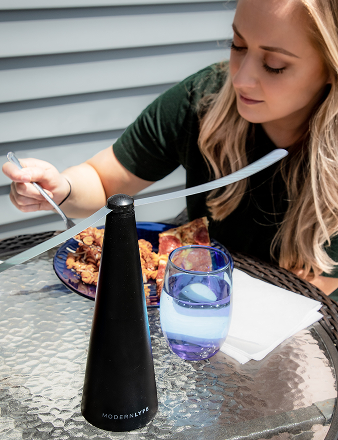
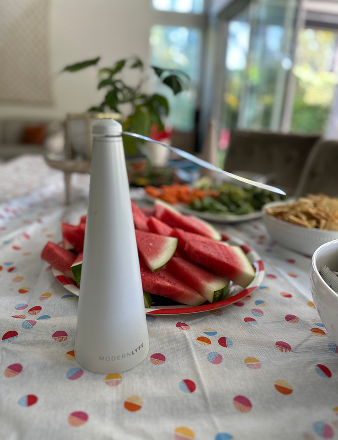
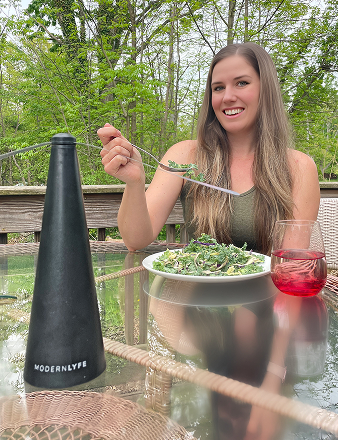
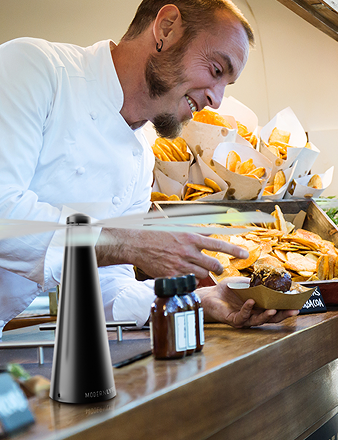
You're likely looking at a dining setup, a buffet plan, or an event run sheet and asking a practical question: will this fan work in service, not just on a product page?
That's the right question. In hospitality, equipment gets judged under pressure. A unit that looks fine in a listing can still create problems if it takes too much table space, adds charging friction, gets in the way of service, or can't hold up through repeated setup and cleanup cycles.
That's why technical specifications matter. They aren't marketing copy. They are the document set that turns a broad product promise into precise, measurable criteria such as dimensions, materials, performance thresholds, interface details, and validation requirements, as explained in this technical specifications overview. For a restaurant manager, caterer, or venue buyer, that shift matters because it turns “battery-powered fly fan” into something you can evaluate for procurement, deployment, cleaning, maintenance, and replacement planning.
Your Guide to Modern Lyfe Fan Specifications
A buyer rarely needs more adjectives. A buyer needs to know whether a unit will fit on a crowded two-top, stay unobtrusive during plated service, and remain easy for staff to reset between events.
That's the lens to use when reviewing Modern Lyfe fly fan product details. A useful technical specification doesn't stop at naming features. It translates those features into operating decisions. If a fan is compact, what does that mean for place settings? If the blades are soft, what does that mean for guest contact? If the unit is battery-operated, what does that mean for charging rotation across lunch, cocktail hour, and dinner service?
Practical rule: A specification is only useful when the floor manager can act on it.
In working terms, technical specifications are the single source of truth between purchasing, operations, and support. They define what a product is, how it should perform, and how a team can verify that it's still fit for service after repeated use.
For hospitality teams, that's the difference between a clean rollout and a chain of avoidable small failures. The fan itself may be simple. The buying decision isn't. Buyers need clarity on fit, handling, power management, cleaning, and placement discipline. Raw specs help, but operational interpretation is what prevents bad purchases.
Quick Reference Specifications Table
Fast comparison matters when you're reviewing multiple equipment options during procurement. The table below is the kind of format buyers commonly use. It lets you scan major differences before getting into placement, charging, and maintenance implications.

Modern Lyfe Fly Fan Model Comparison
| Specification | ML-100 Classic | ML-200 Pro | ML-300 Compact |
|---|---|---|---|
| Intended use | Standard dining tables | Buffet lines and high-traffic service zones | Tight table layouts and portable event kits |
| Power mode | Battery-operated | Battery-operated | Battery-operated |
| Blade design | Soft flexible blades | Soft flexible blades | Soft flexible blades |
| Stop behavior | Touch-stop style safety handling | Touch-stop style safety handling | Touch-stop style safety handling |
| Noise priority | Balanced for guest-facing use | Slightly stronger service presence | Lowest physical intrusion |
| Placement profile | General restaurant and patio use | Longer service surfaces | Small tables, bars, tasting stations |
| Reset workflow | Simple tabletop repositioning | Best for semi-fixed event placement | Fast redeploy during room turns |
Without verified model-specific measurements for these fly fans, the right way to compare them is by operational role, not invented numbers.
How to read the table
If you run a seated restaurant, start with the table footprint question. A classic model usually suits standard two-top and four-top layouts because it balances coverage and visibility. If your main issue is uncovered food on a buffet or grazing station, a pro-oriented model is often the better fit because staff can assign it to a predictable serving zone rather than moving it with every guest reset.
For mobile teams, compact units often create fewer headaches. They pack faster, fit more table formats, and reduce the chance that a last-minute layout change breaks your service plan.
Use the comparison this way:
- For fixed dining layouts: Prioritize unobtrusive placement and easy wipe-downs.
- For buffet service: Prioritize predictable coverage zones and simple repositioning.
- For event crews: Prioritize portability, fast charging routines, and low training overhead.
A useful specification table shouldn't answer every question. It should tell you which questions matter next.
Electrical And Battery Specifications
Battery specifications are where many buyers lose time. They focus on the headline runtime and miss a critical operating issue, which is whether staff can keep units ready without adding another fragile process to service.
When you review electrical and battery details, think in terms of workflow. Hospitality teams don't charge one device in isolation. They charge batches of units, often between shifts, during breakdown, or overnight. The important questions are compatibility, visibility, and routine.
For a broader look at how buyers think about portable fan power setups, battery-operated table fan use cases are useful context.
What matters more than the battery label
A spec sheet may list battery type, charging input, indicators, and expected charging behavior. Those details matter because they affect how reliably the fan returns to service.
Focus on these points:
- Charging interface compatibility: If the unit uses a common charging standard, replacements and charging carts are easier to manage.
- Status visibility: A clear charge indicator reduces guesswork during setup.
- Batch handling: Fans that can be charged in a repeatable way are easier to assign, rotate, and inspect.
- Cable discipline: The simpler the cable and adapter setup, the less likely staff are to mix chargers or leave units uncharged.
A charging spec isn't just electrical data. It's a staffing question.
How to turn battery specs into service planning
A practical charging routine usually works better than chasing maximum runtime. For example, teams often get better results by assigning a charging window after every event teardown rather than waiting until a fan is nearly depleted.
That approach does three things:
- It gives staff a fixed habit instead of a judgment call.
- It reduces the number of units discovered uncharged at setup.
- It makes replacement planning easier because weak batteries become visible sooner.
If your service depends on battery gear, your charging process matters as much as the product.
For all-day or multi-segment events, treat battery-operated fans the same way you'd treat handheld POS units or cordless lighting accessories. Build a rotation. Label devices. Keep charging leads organized by station. Don't assume someone will “top them off later.”
Questions procurement should ask
When reviewing electrical specifications, ask for clarity on:
| Procurement question | Operational reason |
|---|---|
| How is charge status indicated? | Staff need a quick pre-service check |
| What charging accessories are included? | Missing accessories slow deployment |
| Can units be charged in a batch workflow? | Important for venues and catering teams |
| Is the charging setup simple to standardize? | Reduces staff error and cable confusion |
A battery-powered fan can be easy to live with, or irritating in daily use. The difference usually comes down to charging discipline and whether the electrical design fits your actual service rhythm.
Mechanical Design And Dimensions
A server is setting a twelve-top for a patio dinner. Plates are down, water glasses are filled, floral pieces are centered, and there is one open spot left for the fan. That final placement decision is where mechanical specifications stop being abstract. Height, base diameter, and overall footprint determine whether the unit fits the service pattern or creates one more object staff have to work around all night.
For procurement, the question is simple. Does the fan occupy space in a way the operation can live with during setup, service, clearing, and storage?
Read dimensions in service context
A spec sheet may list height, width, and weight. Those numbers matter only after they are translated into table behavior.
Start with visibility. A taller unit can interrupt sightlines across a two-top or small cocktail table, even if its base is compact. A shorter unit usually integrates more cleanly, but only if the head angle still places airflow where it is needed. Buyers comparing compact models can use a 100 CFM blower sizing guide as a useful reference for how physical size and output often need to be balanced rather than judged separately.
Base size is usually the deciding dimension in hospitality use. Staff can work around a product that is slightly taller. They get frustrated with a base that competes with glassware, condiments, share plates, or check presenters. Weight matters too. A light fan is easier to move in bulk, but if the base is too light for a busy dining room, it gets nudged, rotated, or tipped during normal service.
What to verify before buying quantity
Mechanical review should answer these practical questions:
- Does the unit fit a standard two-top without forcing a new table layout?
- Can a server clear plates or wipe the table without lifting the fan each time?
- Is the base wide and heavy enough to stay planted when guests bump the table?
- Does the fan store efficiently on back-of-house shelving, in transport tubs, or in event carts?
- Can staff grasp and reposition it with one hand, or does the shape make handling awkward?
Those checks prevent a common procurement mistake. A fan can meet electrical and airflow targets and still underperform operationally because its shape does not match the table.
Clearance matters beyond the footprint
Overall width is only the starting point. Operators also need clearance around the unit so it can function without constant interference.
Three clearances matter most:
- Base clearance: room to place the fan without crowding dining ware or centerpiece elements
- Operating clearance: enough surrounding space that guards, blades, or moving parts are not obstructed by menus, linens, or decor
- Edge clearance: enough setback from the table edge to avoid contact with trays, sleeves, handbags, and guest movement
I treat edge clearance as a maintenance issue as much as a placement issue. Units positioned too close to the edge get knocked more often. That leads to cosmetic damage, misalignment, and more frequent replacement requests.
Storage and event handling are part of mechanical design
Dimensions affect the table, but they also affect labor. Venues and caterers rarely deploy one unit at a time. They deploy dozens, transport them in batches, and store them under time pressure after breakdown.
That is why handle shape, stackability, and packed volume deserve attention during evaluation. Teams that already manage other event equipment, including professional event photography gear, know that awkward shapes cost time every time items are loaded, unloaded, or shelved. The same principle applies here. A fan with a clean storage footprint is easier to count, stage, and protect between events.
A quick placement review
| Checkpoint | What to verify |
|---|---|
| Guest sightline | The unit does not block face-to-face conversation on smaller tables |
| Service path | Staff can reach plates, glassware, and table edges without repeated repositioning |
| Stability | The base stays secure during normal bumps and close-quarters service |
| Decor conflict | Candles, florals, table numbers, and menus do not force awkward placement |
| Storage footprint | Units fit shelves, bins, or transport carts without wasted space |
Mechanical specifications earn their place in the buying decision when they reduce friction on the floor. The right dimensions make deployment predictable. The wrong ones turn every table reset into a workaround.
Performance Metrics Airflow Noise And Efficacy
Performance is where buyers can get distracted by standalone figures. In service, airflow, noise, and usable coverage have to be read together. A fan that moves more air but disrupts conversation may be wrong for dining tables. A quieter unit may be the right pick if guest experience matters more than pushing coverage farther across a service surface.

The visual above shows the kind of KPI framing buyers often use when comparing fan equipment: airflow volume, noise level, effective radius, and power efficacy. Those values are presented in the graphic itself and work as a model for how to evaluate fan performance in operational terms.
What the numbers mean on the floor
Airflow is useful only if it supports the intended protection zone. On a buffet, that usually means keeping a consistent moving-air barrier over exposed food. On a dining table, the target is narrower. You want the fan to discourage flies without pushing napkins around or making the setup feel mechanical.
Noise has to be judged against the setting. In a bar patio, a bit more audible fan presence may not matter. In a wedding reception or fine-dining service, it matters quickly. Buyers who manage guest experience should read acoustic performance as part of ambiance control, not as a side spec.
For teams that also document events, there's a parallel with professional event photography gear. The best tool on paper isn't automatically the best tool in a live room. The right choice depends on how it behaves under real operating constraints.
Runtime is an operational metric
Runtime should be read as shift coverage, not as a brag line. The key question is whether the fan can complete the service window you care about without staff intervention.
Use this lens:
- Single meal period: A fan may only need to cover one lunch or one dinner push reliably.
- Back-to-back events: Runtime matters more when reset windows are short.
- Outdoor extended use: Heat, repeated repositioning, and longer event hours put more pressure on battery planning.
If you're comparing broader air-movement concepts, 100 CFM blower guidance is a helpful contrast because it shows how airflow figures can sound meaningful while still needing context.
Strong performance specs answer a coverage question, a guest-comfort question, and a power-use question at the same time.
What works and what doesn't
What works:
- Matching airflow to the service zone.
- Choosing low-noise operation for seated dining.
- Treating runtime as part of staffing and charging workflow.
What doesn't:
- Buying on a single airflow number.
- Ignoring acoustic impact.
- Assuming one fan format fits tables, buffets, and mobile event setups equally well.
Performance data becomes useful only when it changes deployment decisions.
Materials Construction And Durability
Material choice decides whether a product still looks professional after repeated use. In hospitality, that's not cosmetic. Presentation affects trust. If a tabletop device scuffs easily, traps grime, or starts looking tired after routine handling, staff will stop wanting it on guest-facing surfaces.
For food-service environments, specifications should map material safety, electrical safety, and hygiene requirements to the target market, and best practice is to treat those specifications as living documents so the product definition keeps pace with field feedback and regulatory changes, as outlined in this technical specifications guidance for procurement and compliance.
What buyers should look for in construction
A good materials spec explains the reason behind each choice. It should tell you why the housing material was selected, why the blades are designed for contact safety, and how the finish supports repeated cleaning.
The practical checklist looks like this:
- Surface cleanability: Smooth surfaces usually reduce wipe-down time and visible residue.
- Contact tolerance: Flexible blade construction matters where guests, staff, and children may reach near the unit.
- Finish stability: A clean-looking finish needs to hold up through frequent handling, transport, and storage.
- Food-adjacent suitability: The unit should make sense on or near dining and buffet surfaces from a hygiene standpoint.
Climate changes the durability conversation
Material labels alone don't tell you much. The better question is how the unit will age in the environment where you'll use it.
In humid and coastal conditions, guidance in related outdoor hospitality equipment categories often recommends stainless steel for rust resistance over less durable materials, which highlights a broader point for spec review: buyers should ask how long the product will stay presentable and reliable, not only what it's made from, as noted in this climate and grill material guide.
That lesson applies even when the fly fan itself isn't a stainless product. If your venue operates on patios, pool decks, waterfront terraces, or semi-open event spaces, the spec should help you judge how the finish and hardware will behave over time.
Construction details that reduce ownership friction
Look for signs that the product was designed for repeated hospitality use rather than occasional home use:
| Construction feature | Why it matters |
|---|---|
| Wipeable outer body | Faster turnover between events |
| Flexible contact surfaces | Better for guest-facing settings |
| Stable assembly | Fewer rattles and fewer placement issues |
| Simple seams and joints | Easier cleaning and less grime buildup |
A durable unit doesn't need to look industrial. It needs to survive normal handling without becoming a maintenance nuisance.
Installation Mounting And Placement Guide
A fan that looks right on the spec sheet can still create service problems once it hits a live floor. At a banquet table, a few inches in the wrong direction can block a platter, crowd a place setting, or end up pushed aside by staff before the first course lands. Placement needs to be treated as an operating decision, not a styling choice.

For tabletop hospitality equipment, the useful questions are simple. What zone needs protection. How much table real estate can the unit take without affecting guest comfort or server access. How often will staff need to move it during service. Those questions translate dimensions and footprint into a placement standard that people can use on shift.
Placement by service type
The right position depends on the service pattern and table geometry.
- Round dining tables: Place the fan close enough to the shared food zone to do useful work, while keeping sightlines open across the table.
- Rectangular restaurant tables: Offset the unit so staff can reach from both sides without clipping it during plate drops or clears.
- Buffet lines: Aim placement at exposed food areas guests queue past, not at corners or decorative elements that do not need coverage.
- Cocktail stations and bars: Keep the fan clear of garnish trays, drink builds, menus, and payment devices.
In practice, the best location is often slightly off-center. That usually gives better protection of the target area and reduces interference with service traffic.
A simple pre-service placement check
Use this four-step check before doors open:
- Put the fan where it covers the food or guest zone that needs protection.
- Confirm the blade path and housing clear linens, signage, florals, and tiered serving pieces.
- Check seated comfort. Guests should not need to shift the unit to use the table naturally.
- Run one full service motion. Have a staff member place, clear, and reset a setting around the fan.
If step four fails, the spec is not the problem. The placement is.
Set position around service flow first, then fine-tune for coverage.
This short visual can help teams think through mounting and positioning habits in spaces where airflow products are part of the setup:
Common placement mistakes
| Mistake | Operational result |
|---|---|
| Centering by default | Reduces flexibility for shared plates, signage, and table resets |
| Placing too close to the edge | Increases bump risk during service and guest seating |
| Ignoring centerpiece or riser height | Blocks the airflow path and cuts practical coverage |
| Using one position for every layout | Creates inconsistent results across dining, buffet, and bar setups |
For fixed setups, document the chosen position by table type and include it in setup diagrams. For mobile event operations, mark the preferred zone during mock setup and train staff to return the fan to that spot after cleaning or battery charging. That is how raw specs turn into repeatable performance on the floor.
Maintenance Troubleshooting And Support
Maintenance for a tabletop fan should be boring. That's the standard. If care is complicated, it won't happen consistently, especially during busy seasons.
The main goal is to keep the unit clean, stable, and ready to deploy without creating extra back-of-house work.

Routine care that actually sticks
The best maintenance checklist is short enough that staff will follow it.
Use this operating rhythm:
- After service: Wipe the exterior and blades with a soft damp cloth. Remove visible residue before storage.
- During weekly checks: Inspect for wobble, sticky controls, charging issues, or visible wear.
- Before long storage: Clean fully, charge according to house policy, and store in a dry, protected area.
- At redeployment: Verify the fan starts normally and that the housing and blades are free of damage.
In humid or coastal environments, material choice affects how equipment stays presentable over time. In related outdoor equipment guidance, stainless steel is often recommended for rust resistance in places like South Florida, which reinforces the practical maintenance question hospitality buyers should ask: how long will this stay clean-looking and reliable in my environment?
If then troubleshooting guide
When staff are under pressure, troubleshooting needs to be direct.
If the fan doesn't start
- Check whether the battery was charged during the last rotation.
- Confirm the charging cable and adapter were seated properly.
- Inspect the power control for residue or physical sticking.
If the fan seems weak in service
- Recheck placement before assuming a hardware fault.
- Make sure linens, decor, or serving items aren't interrupting the blade path.
- Review whether the unit was expected to cover too large an area.
If the fan rattles or feels unstable
- Inspect for loose assembly points or impact damage.
- Move the unit to a flatter, less crowded surface.
- Remove it from service if the wobble persists.
A fan that needs repeated adjustment during service should be inspected off the floor, not tolerated on the table.
Support and replacement thinking
Support matters most when the issue is repeatable. One-off charging mistakes are training issues. Repeated failures with the same unit usually indicate either battery degradation, hidden physical damage, or a process problem in storage and transport.
A simple support log helps:
- device ID
- issue observed
- date found
- charging status
- action taken
That turns vague complaints into usable service records. Over time, it also helps a manager decide whether the problem sits with the product, the environment, or the handling routine.
Certifications Warranty And Ordering Information
At this stage, technical specifications stop being descriptive and become commercial control documents. Serious buyers don't review specs only to understand a product. They review specs to reduce risk.
That's consistent with how technical specifications evolved in regulated industries. The U.S. Nuclear Regulatory Commission notes that technical specifications became formalized as safety-critical compliance instruments, with a policy milestone on July 22, 1993, and later codification in federal regulation. That history matters because it shows a broader pattern. Across industries, specifications aren't just descriptive sheets. They can serve as enforceable records for safety, interoperability, and lifecycle accountability, as explained in the NRC technical specifications overview.
What procurement should confirm before ordering
For hospitality equipment, certifications and warranty details answer three procurement questions:
- Is the product appropriate for the market where it will be used?
- What support exists if the product fails under normal use?
- Can the team order, track, and replenish units cleanly?
A clean ordering packet should include:
- model identifier
- variant details if applicable
- warranty terms
- support path for claims
- bulk ordering instructions for multi-site buyers
Read warranty terms like an operator
A warranty only helps if the team can use it without friction. Buyers should look for plain answers to these questions:
| Warranty question | Why it matters |
|---|---|
| What failures are covered? | Distinguishes defect issues from handling damage |
| What proof is needed? | Helps teams keep the right purchase records |
| How is service requested? | Important for venues managing multiple units |
| What ends coverage? | Prevents avoidable claim denials |
For ordering, the best documentation is simple and complete. If a buyer has to chase down basic details across separate pages, the specification package isn't finished.
Frequently Asked Questions
Can these fans be used outdoors?
Yes, in many hospitality scenarios they can be used outdoors, but placement matters. Covered patios, garden receptions, poolside dining, and buffet tents are common use cases. The key is to avoid treating a tabletop fan like weatherproof infrastructure. Protect it from direct exposure, keep it stable on flat surfaces, and remove it promptly after service rather than leaving it out overnight.
Are soft blades actually safer in guest-facing settings?
They're generally the right design choice for tabletop hospitality use because accidental contact is possible during service. That doesn't mean staff should place the fan carelessly. It means the product is better suited to dining environments where hands, sleeves, menus, and children may come close to the unit. The safer design still depends on sensible placement.
How many fans do I need for a buffet table?
There isn't a single correct answer without the exact buffet layout, dish arrangement, and placement plan. The practical method is to divide the table into active food zones and assign coverage based on those zones, not on the total furniture length alone. Buyers usually make better decisions by staging one sample layout first, then testing whether each exposed section is covered without dead spots.
Can I use my own charging cable?
Possibly, if the interface matches the product requirement, but operationally it's better to standardize. Mixed charging accessories create preventable confusion. If your venue manages multiple battery devices, assign approved cables and charging locations so staff aren't guessing which lead belongs to which unit.
What's the biggest mistake buyers make with fly fan specifications?
They read the spec sheet as a list of features instead of a deployment guide. The useful question isn't whether the fan has battery power, soft blades, or a compact body. The useful question is whether those specifications fit your service model, your table layouts, your cleaning routine, and your charging discipline.
If you're evaluating fly fans for restaurant tables, buffets, patios, or event service, MODERN LYFE is worth reviewing as part of your shortlist. The practical approach is simple: compare the product's technical specifications against your actual operating conditions, then choose the setup your staff can deploy, charge, clean, and maintain without friction.