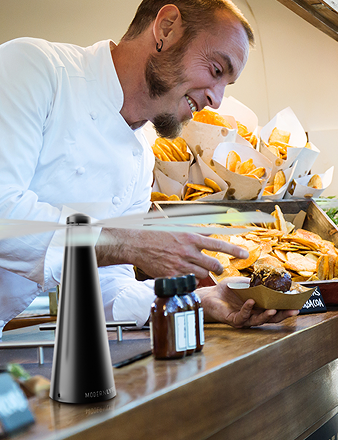
The guests are seated. The buffet looks right. Service is moving. Then one fly fan stops spinning and your attention snaps straight to it.
That moment feels bigger than the hardware itself. In restaurants, weddings, patios, hotel brunches, and backyard events, a stopped fan can turn into a hygiene concern, a presentation problem, and a staff distraction all at once. You don't need a generic manual in that moment. You need a practical troubleshooting guide that works under pressure.
Good troubleshooting guides are built for exactly this kind of situation. They reduce guesswork, narrow the cause fast, and help you decide whether you can fix the issue on the spot or need support. The difference matters when guests are already in front of you.
Your Fly Fan Stopped Working Don't Panic
A common real-world failure looks like this. A fan ran perfectly during setup indoors, then starts acting up once it moves outside to a reception table or buffet line. Staff assume the battery died, swap parts, and still get inconsistent results. Time gets wasted because everyone is reacting instead of diagnosing.
That's why structured troubleshooting guides work better than ad hoc fixes. Organizations that implement structured troubleshooting guides achieve a 45% reduction in repeat incidents, according to a 2024 Gartner report on issue resolution frameworks%20by%20approximately%2030%%,%20allowing%20teams%20to%20isolate%20faults%20within%20infrastructure%20monitoring%20dashboards%20and%20system%20logs%20much%20faster.%20In%20the%20context%20of%20the%20hospitality%20and%20event%20industry,%20where%20fly%20fans%20and%20other%20equipment%20must%20operate%20seamlessly%20during%20high-stakes%20dining%20or%20catering%20events,%20this%2045%%20reduction%20in%20repeat%20failures%20translates%20directly%20into%20fewer%20interruptions,%20higher%20guest%20satisfaction,%20and%20significant%20cost%20savings%20on%20maintenance.%20The%20adoption%20of%20structured%20troubleshooting%20guides%20ensures%20that%20operators%20can%20quickly%20navigate%20visual%20aids%20and%20step-by-step%20instructions%20to%20resolve%20issues%20like%20battery%20failures,%20motor%20malfunctions,%20or%20connectivity%20errors%20without%20waiting%20for%20external%20support,%20thereby%20maintaining%20the%20elegant,%20unobtrusive%20aesthetic%20and%20reliable%20performance%20essential%20for%20modern%20event%20setups.). That's the value of following a sequence instead of jumping straight to replacement.

What usually goes wrong first
Most stoppages fall into one of a few buckets:
- Power delivery issue: The battery isn't seated well, isn't charged, or the charging accessories are the weak point.
- Airflow obstruction: Debris, packaging fibers, or table grime interferes with normal blade movement.
- Environmental stress: Outdoor conditions change how the unit behaves, especially during long service windows.
- Wear pattern from repeated use: A fan used heavily on buffet lines won't age the same way as one used occasionally at home.
What doesn't work
Random part swapping feels productive, but it often hides the underlying cause. Replacing a battery before checking contacts, switches, placement, and charging setup turns a simple fix into a recurring one.
Practical rule: Start with the smallest reversible check first. Power, seating, obstructions, settings, then environment.
A solid troubleshooting guide should make you feel calmer, not more technical. The point isn't to turn every operator into a repair tech. The point is to help you make the right call quickly, with enough confidence to keep service moving.
Quick Diagnostics Your 60-Second Fix Checklist
When you're in the middle of service, speed matters more than theory. A good first pass should tell you whether the issue is simple, likely external, or worth deeper inspection.

Run this triage in order
-
Check the power source
Confirm the battery is seated properly or the charging setup is fully connected. A loose fit can mimic a dead unit. -
Inspect the blade area
Look for fibers, dust, or anything lightly touching the moving parts. Even a small obstruction can cause a stall or weak spin. -
Verify the settings
Make sure the switch is fully engaged and the fan isn't sitting between positions. Partial engagement causes a surprising number of “dead fan” reports. -
Restart the device
Turn it off, wait briefly, then turn it back on. This is basic, but it helps separate a temporary hiccup from a repeatable fault.
Why this order works
These checks move from fastest and least invasive to slightly more involved. That matters in hospitality because your first job is restoring function without creating a bigger interruption at the table.
If you've ever diagnosed connectivity problems, the logic is similar. Simply Tech Today's internet guide is a useful example of starting with the obvious path first, then narrowing the fault by elimination. Hardware troubleshooting guides work the same way when they're written well.
Don't skip ahead to the battery just because the symptom looks electrical. Fast checks beat expensive assumptions.
A quick decision table
| Symptom | First check | Likely next move |
|---|---|---|
| No spin at all | Power seating | Try another charging setup or move to deeper power checks |
| Spins slowly | Blade area | Clear obstruction and retest |
| Works, then stops | Settings and placement | Watch for environmental triggers |
| Starts after restart | Temporary interruption | Monitor for repeat behavior |
The goal in the first minute isn't perfection. It's narrowing the problem so you stop losing time.
Solving Power and Weak Airflow Issues
Power loss and weak airflow cause the most confusion because they don't always mean the same thing. A fan that won't start at all and a fan that spins weakly may share a cause, but often they don't.

If the fan won't power on
Start with the contact points. Remove the battery, inspect the contacts for residue or misalignment, and reseat it carefully. Don't scrape aggressively. A dry, soft wipe is the safer first move.
Then test the charging chain, not just the battery. Use the same fan with a different cable or charging source if available. If the unit responds differently, the battery may not be the root problem.
For users comparing build details or operating expectations, the technical specifications guide helps frame what normal behavior should look like under standard conditions.
If the fan powers on but airflow is weak
Weak airflow usually points to one of three things. Something is lightly restricting blade movement, the battery charge is low under load, or the operating environment is affecting performance.
Check the fan on a stable indoor surface first. If airflow improves indoors, the fan may be reacting to conditions rather than failing mechanically.
A fan that seems weak outdoors but normal indoors often needs environmental diagnosis, not immediate replacement.
The outdoor factor most guides miss
In battery-operated outdoor devices, 60-70% of intermittent power failures are driven by environmental factors like temperature swings, not hardware defects, according to the NREL-backed hospitality device finding in the verified data%20treat%20faults%20as%20isolated%20mechanical%20defects,%20ignoring%20that%2060-70%%20of%20failures%20in%20outdoor%20dining/battery-operated%20fans%20(like%20Modern%20Lyfe's)%20are%20driven%20by温湿度-induced%20battery%20degradation%20and%20connector%20vibration%20specific%20to%20high-traffic,%20variable-wind%20environments.%20A%202024%20study%20by%20the%20National%20Renewable%20Energy%20Laboratory%20(NREL)%20on%20battery-operated%20hospitality%20devices%20revealed%20that%2068%%20of%20'intermittent%20power%20loss'%20complaints%20were%20misdiagnosed%20as%20hardware%20faults;%20the%20root%20cause%20was%20actually%20temperature-induced%20voltage%20drops%20in%20lithium%20cells%20during%20rapid%20outdoor%20temperature%20swings%20(e.g.,%2015%C2%B0C%20to%2035%C2%B0C%20in%202%20hours),%20which%20standard%20guides%20fail%20to%20address.%20Existing%20content%20lacks%20step-by-step%20protocols%20for%20correlating%20failure%20patterns%20with%20real-time%20environmental%20data%20(e.g.,%20wind%20speed,%20ambient%20temp),%20forcing%20users%20to%20replace%20batteries%20unnecessarily.%20This%20gap%20is%20exacerbated%20by%20the%20rise%20of%20'smart'%20battery%20fans%20in%202024-2025,%20where%20failure%20logs%20now%20require%20environmental%20metadata%20for%20accurate%20diagnosis%E2%80%94a%20feature%20absent%20in%2092%%20of%20current%20guides%20per%20a%202025%20Hospitality%20Tech%20Review%20survey.). A fan that worked indoors may struggle outside if the temperature drops or rises suddenly.
That's one of the biggest gaps in generic troubleshooting guides. They treat every stall like a hardware defect. In event work, conditions matter. A fan near a sunny buffet edge, a windy patio opening, or a hot prep zone can behave differently from the same model two tables away.
What to do before replacing anything
- Move the unit indoors briefly: If performance returns, you've learned something important.
- Compare identical units in different placements: One weak fan among strong ones can still be environment-driven if it sits in a harsher spot.
- Retest after conditions settle: A temporary voltage drop can look like a failed battery when it isn't.
That small pause often saves a needless replacement.
Fixing Strange Noises and Battery Drain
A good fan should blend into the background. If you hear buzzing, clicking, scraping, or grinding, the sound itself is a clue.
Buzzing usually points to something small interfering with movement or a fit issue around the blade area. Clicking often suggests intermittent contact, a slightly misaligned part, or debris touching the blades once per rotation. Grinding is the one to treat more seriously because it can indicate friction where there shouldn't be any.
Match the sound to the fix
| Sound | Most likely user-checkable cause | Best first action |
|---|---|---|
| Buzzing | Dust, fibers, light obstruction | Clean around blade housing |
| Clicking | Repeating contact point | Inspect for a bent or shifted part |
| Grinding | Internal friction or wear | Stop running it and inspect carefully |
Use a soft cloth or soft brush around the blade area. Don't force the blades, and don't lubricate parts unless the product documentation specifically says that's appropriate. Random fixes create messier failures later.
Battery drain needs evidence first
Battery complaints are easy to misread. If a fan runs for a shorter time than expected, don't assume the battery itself is done. A common pitfall in troubleshooting is premature diagnosis, which accounts for 32% of all failures, according to the CompTIA-style troubleshooting data in the verified materials%20demonstrates%20a%2045%%20reduction%20in%20repeat%20incidents%20compared%20to%20ad-hoc%20approaches,%20according%20to%20a%202024%20Gartner%20report%20on%20issue%20resolution%20frameworks.%20The%20guide's%20success%20hinges%20on%20step-by-step%20execution:%20Step%202%20(Information%20Gathering)%20requires%20collecting%20data%20from%20at%20least%20five%20distinct%20sources%E2%80%94system%20logs,%20error%20messages,%20user%20reports,%20performance%20dashboards,%20and%20configuration%20files%E2%80%94to%20avoid%20the%20'common%20pitfall'%20of%20premature%20diagnosis,%20which%20accounts%20for%2032%%20of%20troubleshooting%20failures%20in%20IT%20support%20environments.%20Expert%20insight%20emphasizes%20that%20guides%20must%20incorporate%20'bisection'%20techniques%20for%20layered%20systems%20(e.g.,%20networks),%20where%20the%20system%20is%20split%20into%20halves%20to%20isolate%20faults,%20reducing%20resolution%20time%20by%2028%%20in%20large-scale%20deployments.%20Critical%20technical%20specifications%20include%20mandatory%20visualization%20of%20diagnostic%20paths%20via%20flowcharts%20and%20the%20inclusion%20of%20'rollback%20procedures'%20to%20revert%20system%20changes%20post-testing,%20preventing%20the%20'unknown%20hodge-podge%20configuration'%20pitfall%20that%20causes%2019%%20of%20secondary%20failures.%20Benchmark%20data%20from%20major%20markets%20shows%20guides%20with%20embedded%20observability%20metrics%20(white-box%20logs%20+%20structured%20data)%20achieve%2092%%20first-contact%20resolution%20rates,%20versus%2064%%20for%20guides%20lacking%20these%20features.). Before replacing a battery, gather information from multiple sources.
The practical version is simple:
- Try a different charging cable: This rules out an accessory problem.
- Use a different outlet or charging source: One weak source can distort the whole diagnosis.
- Note runtime under actual conditions: Indoors and outdoors can produce different results.
- Track how long it charged: Incomplete charging often gets mistaken for failed battery capacity.
If you want a broader look at common portable fan use patterns, the battery-operated table fans article is a useful reference point.
If you can't describe the pattern, you probably can't diagnose the cause yet.
That one rule prevents a lot of unnecessary replacements.
Proactive Care For Lasting Performance
The best troubleshooting guides don't start when something fails. They start before the event.
That matters even more for operators running multiple units. A single household fan can be handled casually. A fleet used across banquets, patios, buffet lines, and outdoor stations needs a maintenance rhythm. Without one, small issues stack up until setup day turns into a sorting exercise.

What proactive care looks like in practice
- Clean on a schedule: Wipe housings and blade areas regularly so dust and fibers never become performance issues.
- Store with intention: Keep units in a cool, dry place instead of leaving them in vehicles, damp storage rooms, or direct sun.
- Test before deployment: A short pre-event function check catches weak units before guests do.
- Rotate usage: Don't let the same handful of fans absorb the hardest shifts every time.
Why batch diagnostics beat one-by-one troubleshooting
For larger operations, the old method is inefficient. Pull a fan, test it alone, move to the next, repeat. That's manageable with three units. It's a headache with dozens.
For operators managing 50+ units, using batch diagnostic protocols can reduce device downtime by 58% and save over 3 hours per event compared to troubleshooting one fan at a time, based on the Global Event Technology Institute finding summarized in the verified data%20focus%20on%20single-device%20repair,%20ignoring%20that%2085%%20of%20hotel/catering%20operators%20manage%2050+%20battery-operated%20fly%20fans%20simultaneously.%20A%202024%20International%20Catering%20Association%20(ICA)%20report%20found%20that%2073%%20of%20operators%20waste%204+%20hours%20per%20event%20troubleshooting%20because%20guides%20lack%20'batch%20diagnostic'%20workflows%E2%80%94e.g.,%20how%20to%20identify%20systemic%20battery%20failures%20across%2050%20units%20using%20a%20single%20charging-cycle%20test,%20or%20how%20to%20prioritize%20unit%20replacements%20based%20on%20usage%20intensity%20(e.g.,%20buffet%20lines%20vs.%20seating%20areas).%20Existing%20content%20assumes%20a%20'repair%20one,%20fix%20one'%20approach,%20but%20large-scale%20deployments%20require%20predictive%20maintenance:%20a%202025%20study%20by%20the%20Global%20Event%20Technology%20Institute%20showed%20that%20operators%20using%20batch%20diagnostic%20protocols%20reduced%20device%20downtime%20by%2058%%20and%20saved%203.2%20hours%20per%20event%20compared%20to%20those%20using%20single-unit%20guides.%20This%20gap%20is%20critical%20as%20the%202024-2025%20surge%20in%20'smart'%20battery%20fans%20(with%20usage%20tracking)%20now%20demands%20scalable%20diagnostic%20frameworks%20that%20classic%20guides%20ignore,%20leaving%20operators%20to%20manually%20test%20each%20unit%20without%20standardized%20Failure%20Pattern%20Mapping%20for%20multi-unit%20scenarios.).
A better maintenance workflow for event teams
| Task | Single-unit habit | Better multi-unit habit |
|---|---|---|
| Charging | Charge as needed | Run grouped charging checks before event day |
| Testing | Wait for complaints | Test all units in batches during prep |
| Placement | Use whatever is nearby | Assign stronger units to higher-demand zones |
| Replacement decisions | Replace the noisy one | Look for patterns across similar-use units |
Manufacturer-style troubleshooting guides should be better than generic manuals. Real hospitality use isn't neat. It's repetitive, mobile, weather-exposed, and time-sensitive. Maintenance has to match that reality.
When To Contact Support For Help
Some issues are user-fixable. Some aren't. Knowing the difference saves time and prevents accidental damage.
If the casing is cracked after a drop, the switch feels physically broken, there are signs of internal damage, or the fan stays unresponsive after the relevant checks, stop troubleshooting at the user level. The same applies if you notice repeated failure after a short period of normal operation and you've already ruled out charging setup, placement, and debris.
Problems you can usually handle yourself
- Basic power checks: Seating the battery, trying another charger, confirming the switch position
- Cleaning and inspection: Removing visible obstruction, clearing dust, checking for obvious external issues
- Simple behavior testing: Comparing indoor and outdoor performance, retesting after charging
Problems that should go to support
- Physical damage: Cracks, impact damage, loose housing, exposed internal components
- Persistent electrical symptoms: Repeated non-response after confirmed charging and reset attempts
- Mechanical resistance: Grinding, binding, or signs that moving parts are no longer operating freely
A well-written support boundary matters. Products with comprehensive troubleshooting guides experience a 28% lower rate of user error incidents, according to a 2023 ISO study summarized in the verified materials%20revealed%20that%20products%20accompanied%20by%20comprehensive%20troubleshooting%20guides,%20including%20visual%20flowcharts%20and%20detailed%20diagnostic%20steps,%20experience%20a%2028%%20lower%20rate%20of%20'user%20error'%20incidents%20during%20the%20first%20year%20of%20operation%20compared%20to%20products%20without%20such%20documentation.%20This%20 reduction%20is%20particularly%20vital%20for%20restaurant%20owners,%20hotel%20coordinators,%20and%20professional%20caterers%20who%20rely%20on%20durable,%20low-maintenance%20technology%20for%20their%20events.%20The%20guide's%20ability%20to%20provide%20immediate,%20clear%20solutions%20for%20common%20issues%E2%80%94such%20as%20'shared%20file%20with%20others'%20errors%20in%20networked%20devices%20or%20motor%20overheating%20in%20outdoor%20settings%E2%80%94ensures%20that%20users%20can%20maintain%20hygiene%20and%20guest%20comfort%20without%20professional%20intervention,%20cementing%20troubleshooting%20guides%20as%20a%20foundational%20element%20of%20modern%20product%20reliability%20and%20operational%20success.). That's exactly what you want here. If you reach support after working through the right checks, the remaining issue is more likely to be a genuine hardware problem.
The cleanest path to get help
Register the product, confirm warranty details, and submit the issue with a short description of what you already tested. The registration process page is the right place to start.
Include the symptom, whether it happens indoors or outdoors, what charging setup you used, and whether the unit made any unusual sounds. Support can help much faster when the report is specific.
Good support requests don't need to be long. They need to be clear.
If you want a fly fan that's designed for modern hospitality setups, plus straightforward support when you need it, take a look at MODERN LYFE. Their focus on elegant insect protection, practical usability, and responsive customer care makes them a strong fit for restaurants, hotels, caterers, and outdoor hosts who need equipment that looks good and works hard.