A guest walks up to the host stand ten minutes before a private dinner starts. The patio is set, the buffet is plated, and then the problem lands. A rental item hasn't arrived. A table-side device isn't working. The contact person from the vendor isn't answering the phone. Your team isn't thinking about “support operations” in that moment. They're thinking about whether service will break down in front of paying guests.
That's what customer support assistance means in hospitality. It isn't a back-office function. It's the part of the business that keeps a small issue from becoming a guest-facing failure.
Restaurants, caterers, hotels, and event teams live inside tighter time windows than most businesses. A software company can often afford to tell a customer, “We'll get back to you tomorrow.” A catering manager with a wedding load-in at noon usually can't. Support has to be fast, clear, and usable under pressure.
That urgency is one reason support quality connects so closely to loyalty. In a 2026 compilation, 95% of consumers said customer service is essential for brand loyalty, and 60% said they abandoned a brand for a competitor because of poor service, according to Help Scout's customer service statistics roundup. Hospitality operators already know this instinctively. Guests remember the meal, but they also remember how the team handled the problem.
Great Hospitality Demands Great Support
Dinner service rarely falls apart because of one dramatic mistake. More often, it slips because nobody owns the fix.
A manager emails a supplier about a damaged shipment and gets a reply with no timeline. A banquet captain calls for setup help and reaches a general voicemail. A couple planning an outdoor reception asks whether a product can run through the whole event, and the answer comes two days later, after they've already booked somewhere else. In each case, the product matters. But the support experience decides whether the relationship survives.
Support is part of the hospitality promise
Hospitality businesses sell confidence. Guests want to know the room will be ready, the equipment will work, the backup plan exists, and someone will answer when things go sideways. Customer support assistance is the system behind that confidence.
That system includes simple things that many operators overlook:
- Clear contact paths: A customer should know whether to call, email, or submit a form.
- Fast triage: Urgent event-day issues should never sit in the same queue as routine product questions.
- Practical answers: Staff need to respond with the next step, not just acknowledge the problem.
- Follow-through: If a replacement, refund, or workaround is promised, someone has to own it.
Teams that want to enhance customer support with AI agents usually get the most value when they use automation for routing, FAQs, and after-hours intake, while keeping human staff on the more sensitive event and guest-impacting issues.
Practical rule: In hospitality, support isn't finished when someone replies. It's finished when the operator knows what to do next.
What separates useful support from empty responsiveness
A lot of businesses confuse activity with support quality. They answer quickly, but the answer doesn't solve anything. That's not enough when a restaurant owner is trying to prepare an outdoor service area before doors open.
Good support does three things well. It recognizes urgency, gives the customer a usable path, and reduces repeat friction. If a vendor handles those three, they become easier to buy from again.
That applies whether the issue is a missing invoice, a setup question, a warranty claim, or a table-side equipment problem. For a hospitality operator, reliable support feels like operational insurance. It protects the guest experience before the guest ever notices there was a problem.
Choosing Your Support Channels
Hospitality support breaks when every issue is forced into the same channel. A chef with an urgent service problem shouldn't have to wait on email. A planner requesting warranty paperwork doesn't need a live call if a written process would do the job better.
Support has moved well beyond the phone. In an omnichannel environment, 79% of service leaders say AI investment is essential, and 30% of cases were resolved by AI in 2025, as summarized by Statista's customer service overview. For hospitality operators, that matters because channel choice now affects labor, response speed, and guest impact.

Match the channel to the situation
Phone support still matters most when time is collapsing. If a hotel event team has a product failure during setup, they need real-time troubleshooting and quick escalation. The trade-off is staffing. Phones are expensive to cover well, and missed calls damage trust faster than a slow email response.
Email is better for claims, warranty questions, order corrections, and anything that needs photos, order numbers, or written confirmation. It creates a paper trail, which helps when multiple people on the venue side are involved. The downside is obvious. Email feels slow in a live-service environment.
Live chat works well for pre-purchase questions and straightforward support. A caterer deciding between two product options may only need quick clarification on setup, battery handling, or shipping timing. Chat can also keep your phone lines clear. But if chat isn't staffed consistently, it becomes a false promise.
Social media is not a support desk, but customers use it that way. People will message your brand because it's convenient, especially outside business hours. That's fine for acknowledgment and redirection. It's a bad place to handle detailed troubleshooting or claims that require private information.
Self-service earns its keep
The most underused support channel in hospitality is self-service. A concise FAQ, setup guide, warranty page, and troubleshooting article can prevent the same questions from hitting your staff over and over.
The key is to build self-service around real friction points, not marketing language. Useful help content answers questions like these:
- Before service: How long does setup take?
- During an event: What should staff check first if the device stops working?
- After purchase: Where does the customer register a warranty or request help?
- For replacements: What information should they gather before contacting support?
If you run outdoor dining, buffets, weddings, or market stalls, these answers save time on both sides.
Hospitality Support Channel Comparison
| Channel | Best For | Pro for Hospitality | Con for Hospitality |
|---|---|---|---|
| Warranty claims, order issues, detailed questions | Easy to attach photos, invoices, and event details | Too slow for service-time emergencies | |
| Live Chat | Pre-purchase questions, simple troubleshooting | Fast answers without tying up the phone | Frustrating if no one is actually monitoring it |
| Phone Support | Urgent setup issues, event-day failures, escalations | Best channel for high-pressure situations | Requires trained coverage and clear routing |
| Social Media | First contact, public complaints, basic redirects | Convenient for customers who already use the platform | Poor fit for technical support or private account details |
If a channel exists, staff it properly. An ignored chat widget does more damage than no chat widget at all.
The strongest setup for most hospitality businesses is simple. Use phone for urgent cases, email for documentation-heavy requests, self-service for repetitive questions, and chat only if you can maintain it consistently.
Designing a Seamless Customer Workflow
A support channel is only the front door. The actual test is what happens after the customer walks through it.
Hospitality teams need a workflow that feels predictable under stress. If a restaurant manager reaches out about a failed product during patio service, they shouldn't have to explain the same issue three times to three different people. Good workflow design prevents that kind of waste.

A practical support flow starts with structure. Etech's guidance on technical customer support emphasizes triage, diagnosis using logs and history, and clear escalation paths. That approach fits hospitality well because rushed guesswork usually creates repeat tickets instead of resolution.
Stage one and first contact
Every request should enter through a clear intake point. That could be a contact form, support email, chat, or phone line. What matters is that the business collects the right context early.
Ask for only what helps solve the issue:
- What happened
- When it started
- Where it's happening
- What the customer has already tried
- How urgent it is in operational terms
A wedding planner saying “I need help today before guest arrival” tells you more than “urgent.” For teams refining this process, Modern Lyfe's process improvement article is a useful reference for tightening handoffs and reducing avoidable friction.
Stage two and active resolution
Once the issue is triaged, assign it to one owner. That person may not solve everything personally, but they own the next step and the customer communication.
Many hospitality vendors fail, sending the customer into a relay race between sales, operations, and support. Don't do that. If the issue involves warranty, replacement, or product troubleshooting, one contact should coordinate internally and keep the customer updated.
A simple resolution path often looks like this:
- Known issue: Send the customer the immediate fix and confirm outcome.
- Needs diagnosis: Review order details, prior contact history, and any photos or videos.
- Needs escalation: Move it to the right specialist with all context attached.
- Needs workaround: Offer a temporary option that protects service while the full fix is handled.
If your team is reviewing call handling and queue structure, Hosted Telecommunications' call centre guide is a practical outside reference for thinking through routing, staffing, and escalation design.
The customer should never be the courier between your internal departments.
Stage three and follow-up
Closing the ticket isn't the same as closing the loop. In hospitality, follow-up matters because the immediate issue may be solved while confidence is still shaky.
After resolution, send a short confirmation that includes the outcome, any preventive advice, and who to contact if the problem returns. For recurring issues, turn the case into documentation. That's how support gets stronger instead of busier.
A clean workflow doesn't just reduce chaos. It gives restaurant owners, caterers, and venue managers a reason to trust you the next time they're buying under pressure.
Hospitality Support Best Practices
Hospitality support fails in predictable ways. Teams wait too long to communicate. Front-line staff have no authority to fix obvious issues. Accessibility gets treated like a side topic instead of part of service design. Those aren't small errors. They shape whether guests and buyers feel cared for or trapped.

Be proactive before the event
The easiest support ticket to solve is the one that never gets created. In hospitality, that means getting ahead of event-day questions.
If a customer ordered products for an outdoor reception, don't wait for them to ask how setup works. Send setup guidance, battery expectations, placement notes, and a support contact before the event date. For products used around food service, that pre-event message often matters more than the post-purchase confirmation.
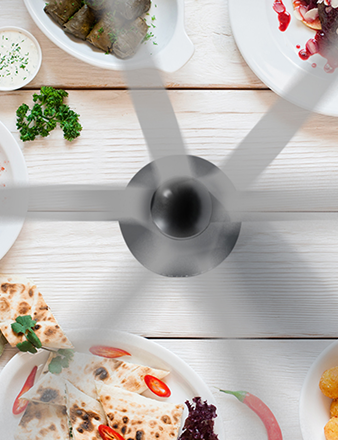
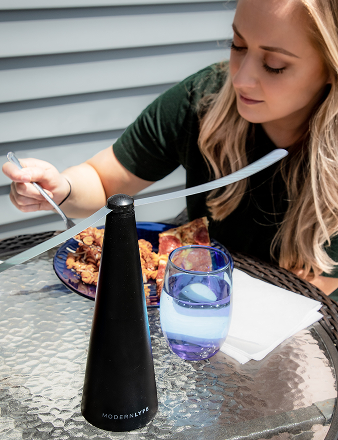
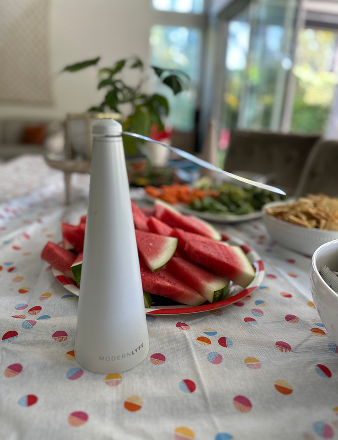
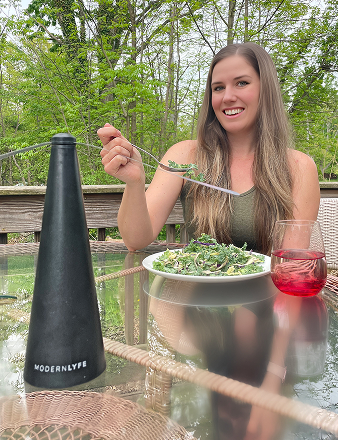
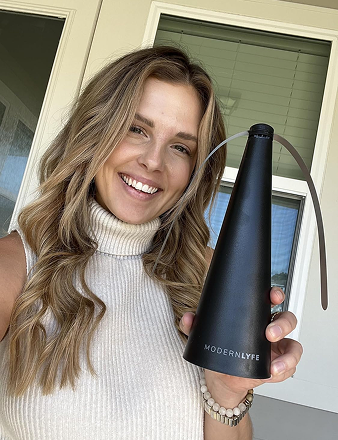
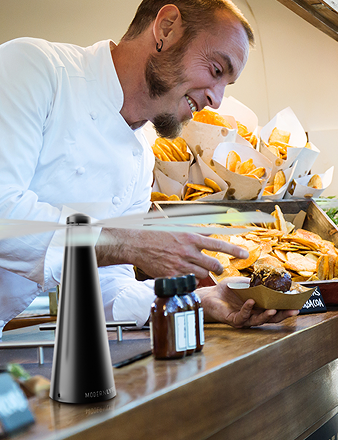
A factual product mention follows. A business like Modern Lyfe, which offers battery-operated fly fans for dining and event setups, creates less support pressure when customers receive clear guidance on placement, operation, and service contacts before they're onsite.
Give front-line staff room to solve problems
Rigid approval chains are bad for hospitality. If every replacement part, shipping exception, or simple refund request needs three layers of sign-off, the customer feels the delay immediately.
Support managers should define clear authority boundaries. Let front-line staff resolve low-risk issues on the spot. Reserve escalations for technical uncertainty, policy exceptions, or high-cost decisions.
That requires training, not just permission. Staff need scripts, troubleshooting checklists, and examples of what “good judgment” looks like. Without that, discretion turns into inconsistency.
Handle mid-service issues differently
A mid-service issue is not a normal ticket. If an event is active, the support standard changes.
Use a separate playbook for live operational disruption:
- Acknowledge urgency fast: Let the customer know you understand this is happening during service or setup.
- Move to the fastest useful channel: Shift from email to phone if the problem is affecting guests now.
- Offer a workaround first: Protect the event before discussing documentation.
- Document after stabilization: Once service is protected, capture the details for warranty or replacement handling.
That order matters. Too many teams start by asking for forms while the customer is still trying to keep a buffet line presentable.
Good hospitality support protects the guest experience first and processes the paperwork second.
Accessibility is part of support design
One of the biggest gaps in generic support advice is accessibility. Deque's article on customer service for people with disabilities makes the point clearly. Effective support has to consider whether the standard channel is usable at all, not just whether the response is fast.
For hospitality businesses, that has very practical implications:
- Deaf or hard-of-hearing customers: Don't force all urgent support through voice calls. Offer text-based options that are monitored.
- Blind or low-vision customers: Write instructions that work with screen readers and avoid image-only guidance.
- Customers with mobility or dexterity limitations: Keep forms short and avoid making support dependent on complex uploads or repeated steps.
- Neurodivergent customers or stressed planners: Use plain language, one next step at a time, and avoid vague replies.
If your support system only works for customers who can comfortably use your preferred channel, it isn't fully working. Teams that care about guest experience should also care about improving guest satisfaction in practical ways, and support accessibility belongs in that work.
Build knowledge from recurring friction
Strong support teams notice patterns. Weak ones keep answering the same question as if it's brand new.
Turn repeated issues into internal and external knowledge. If three caterers ask the same setup question before weekend events, that answer should become a help article. If venue managers keep misunderstanding warranty coverage, rewrite the page. Support should feed documentation, not just clear queues.
Sample Scripts for Common Situations
Templates help when emotions are high and the team needs clean language fast. The scripts below are written for common hospitality situations where speed and tone both matter.

Urgent event-day issue
Use this when a customer reports a problem during active service, setup, or guest arrival. The goal is to lower panic and move toward the fastest practical fix.
We've got your message, and we understand this is affecting a live event. Please reply with your callback number and the quickest way to reach you right now.
While we connect, please tell us what the product is doing, when the issue started, and whether you've already tried any basic reset or setup steps. We'll help you work through the fastest available solution first, then document the issue fully after service is stable.
Warranty claim response
This works when the customer needs a clear process and reassurance that the claim won't disappear into a black hole.
Thanks for reaching out. We can help you with the warranty review.
Please send your order number, a short description of the issue, the date you first noticed it, and any photos or video that show the problem clearly. Once we have that, we'll review the case and confirm the next step. If the item is tied to an upcoming event, include that timing so we can understand the operational urgency.
Out-of-warranty reply
This message should stay firm without sounding dismissive. The objective is to protect goodwill even when the requested outcome isn't available.
Thanks for contacting us and for sharing the details of the issue. Based on the information provided, this situation falls outside our warranty terms.
We still want to help you move forward. We can walk you through troubleshooting, confirm whether a replacement part or alternative solution is available, and help you choose the most practical next step for your setup.
Delay or follow-up script
Use this when the fix isn't immediate but the customer needs confidence that someone is actively managing the case.
I'm following up to let you know your case is still in progress and hasn't been forgotten. We're currently reviewing the details needed to confirm the best resolution.
Our next update will be sent by [time or day]. If your event timing changes before then, reply to this message so we can reassess the urgency.
Write support replies so the customer can scan them under pressure. Short paragraphs beat polished corporate language every time.
How to Measure Your Support Quality
If support quality only lives in gut feeling, it usually gets judged by the loudest complaint. Hospitality teams need a few simple measures they can review without building a complicated analytics stack.
Start with three useful metrics
Customer satisfaction tells you how the interaction felt on the customer side. For a small operator, a one-question follow-up email works fine: “Did we solve your issue in a way that worked for you?” Add a short comment box. Read every answer.
First contact resolution shows whether the team solved the issue without unnecessary back-and-forth. In hospitality, this matters because repeat handling burns time during already compressed service windows. You can track it with a simple tag in your inbox or help desk: resolved on first reply, resolved after follow-up, or escalated.
Average response time matters most when sorted by issue type. Don't lump a warranty document request together with a same-day event problem. Measure urgent operational issues separately from routine support.
Measure the system, not just the staff
Support quality isn't only about agent performance. It reflects channel design, documentation quality, and routing logic. If customers keep asking the same setup question, the problem may be your help content, not your team.
TELUS Digital's guidance on elite tech support notes that self-service and AI-assist tools can act as capacity multipliers, helping teams deflect simple requests and answer complex ones faster. It also recommends dedicated AI quality assurance to monitor accuracy and KPI performance. That's important in hospitality because automation that gives the wrong answer before an event creates more work, not less.
Keep the review rhythm simple
A workable monthly review can fit on one page:
- Top repeated questions
- Cases that required escalation
- Issues that affected live service
- Customer comments with the same root cause
- Help articles or scripts that need updating
You don't need a large support department to do this well. You need consistency, honest review, and a willingness to fix what your inbox keeps revealing.
Turn Customer Support into Your Strength
Strong hospitality support is built, not improvised. It starts with the right channels, gets reinforced by a clean workflow, and becomes memorable when staff handle pressure with clarity and care.
The businesses that do this well don't treat support like a cost to minimize. They treat it like part of the guest experience. That mindset changes decisions. It leads to better triage, better documentation, better accessibility, and better judgment during live service problems.
It also creates a competitive edge that's hard to copy. A restaurant owner, caterer, or hotel buyer may forget a sales pitch. They usually remember the vendor who answered quickly, solved the problem cleanly, and made the event easier to run. If you want a simple framework to track support performance metrics, use one that helps you spot friction early and improve the system over time.
Support becomes even stronger when it reinforces customer confidence after the sale. That's why policies, documentation, and follow-through matter so much. A clear peace of mind guarantee isn't just reassurance on paper. It supports trust when the customer needs help most.
The practical move is simple. Audit your channels, tighten your workflow, train your staff on real scenarios, and fix the questions customers keep asking twice.
If you need hospitality-focused products backed by clear service paths and practical support, take a look at MODERN LYFE. Their solutions are built for dining and event environments where reliability, presentation, and responsive assistance all matter.