Planning an event in 2026 probably looks familiar. Your inbox is full of vendor replies. Registration questions are piling up. Someone wants a seating chart revision, someone else needs a permit answer, and the venue just asked for a revised load-in plan. You're expected to keep budgets tight, guest experience high, and operations calm.
That's why the old clipboard-only approach breaks down fast. The events industry is projected to reach $1.35 trillion in revenue in 2025 and grow to $2.1 trillion by 2032, with a projected 6.4% CAGR, according to these event planning statistics and trends. Bigger budgets and more in-person activity are pushing planners toward better systems, not just more hustle.
The best event planning resources now span more than registration software. You need tools for diagramming, sales, marketing, guest communication, check-in, permits, safety planning, and practical on-site details that guests absolutely notice. If you're still stitching everything together with spreadsheets and text threads, the cracks usually show on event day.
Start with the stack that matches your event type. If you're comparing platforms, this roundup on evaluating event platforms for your needs is a useful companion. Below is the toolkit I'd shortlist for corporate programs, hospitality events, weddings, public ticketed activations, and outdoor food-focused gatherings.
1. Cvent

Cvent is what I'd put in front of a team that's managing complexity across the full event lifecycle. Registration, websites, invitation flows, attendee management, on-site check-in, badging, and reporting all live in one environment. That matters when multiple departments touch the same event.
For large corporate meetings, hotel groups, and restaurant brands with recurring programs, Cvent solves a common problem. It cuts down the handoff failures that happen when marketing owns one tool, operations owns another, and on-site staff are working from exported spreadsheets.
Where Cvent earns its keep
The strongest parts of Cvent are the workflow depth and the maturity of the ecosystem. Advanced registration paths help when you have VIPs, sponsors, staff, speakers, and general attendees all moving through different forms and approval rules. OnArrival is useful for check-in and badge printing when arrival needs to feel fast and controlled.
It's also a good fit when you need consistency across many events, not just one.
- Best for multi-event programs: Teams can standardize branded pages, invitation logic, and reporting practices across different locations.
- Best for internal control: Finance, sales, and event ops usually prefer one source of truth over a patchwork stack.
- Best for hotels and venues: It pairs well with teams that need repeatable sales-to-execution workflows.
Practical rule: If three teams are touching attendee data before doors open, a single platform usually beats a “best of breed” patchwork.
Cvent won't be the right call for everyone. Small one-off social events can get buried in features they'll never use, and quote-based pricing means you need enough event volume to justify the investment. If your work leans more wedding and private celebration than enterprise meetings, these wedding planner resources may be a better operational fit.
2. Eventbrite

Eventbrite works best when speed matters more than customization. If you're launching a workshop, pop-up dinner, public class, festival segment, or community event, it gets you live quickly and gives attendees a registration flow they already trust.
That familiarity matters more than some planners admit. Public-facing events benefit when the ticketing process feels normal to the buyer. Less friction usually means fewer support emails.
Best use case
Eventbrite is strongest for consumer discovery and self-serve setup. You can build a live event page quickly, create ticket tiers, add discount codes, and handle payouts without involving a developer or operations specialist. For lean teams, that's often enough.
Its limits show up when you need deep brand control, layered approval logic, or detailed cross-event analytics. That's when a more powerful platform starts to make sense.
- Works well for public events: Workshops, tastings, local markets, classes, and smaller paid experiences fit naturally.
- Works less well for enterprise ops: If sales attribution, sponsor workflows, or complex registration branches matter, you'll hit the ceiling.
- Watch the fee model: Per-ticket pricing can be fine at modest scale, but expensive events or high-volume ticketing require a closer look.
I like Eventbrite most when the event itself needs exposure, not just infrastructure. If the goal is “get the page up, get found, start selling,” it's still one of the easiest event planning resources to deploy.
3. Bizzabo

Bizzabo is built for event teams that care as much about the attendee journey as they do about logistics. Conferences, summits, and brand experiences are where it makes the most sense. It handles registration and agenda management well, but its primary value is how it ties onsite execution, exhibitor needs, and attendee experience together.
This is the sort of platform I'd look at for repeatable programs where the event is part of a broader brand system.
Why experiential teams like it
Bizzabo's Onsite Command App, check-in workflows, badging, and access control tools are practical, not flashy. They help staff keep the front door moving. The lead capture tools also make it easier to support sponsors and exhibitors without bolting on a separate solution.
Another advantage is the services layer. Some teams don't just need software. They need hardware support and people who've seen live-event problems before they happen.
Good event tech doesn't rescue a weak plan. It does make a strong plan easier to execute under pressure.
The trade-off is complexity. If you just need a registration page for a single annual dinner, Bizzabo is more platform than you need. If you're running a conference series with exhibitors, sponsors, agenda tracks, and branded onsite touchpoints, it's a serious contender.
4. Social Tables (Cvent Event Diagramming)

Social Tables solves one of the most expensive categories of event mistakes. Layout mistakes. Anyone who has watched a room reset late, a buffet back up, or a sweetheart table block a service path knows that diagramming isn't cosmetic work. It's operations.
For weddings, galas, hotel banquets, restaurant buyouts, and catered social events, this is one of the most useful event planning resources you can add.
What it does better than a PDF floor plan
The strength of Social Tables is shared visibility. Planners, venue staff, catering managers, and clients can work from the same layout instead of emailing marked-up screenshots back and forth. Seating assignments, meal preferences, object placement, and room flow all become easier to manage when the visual plan is live.
The 3D walkthrough feature is especially helpful when a client struggles to interpret a flat floor plan. It closes the imagination gap before load-in day.
- Use it for service flow: Don't just place tables. Test aisles, bar lines, buffet access, and staff circulation.
- Use it for client approval: Visual confirmation reduces “that's not what I expected” conversations.
- Use it for outdoor events: Tent layouts, lounge zones, and food stations benefit from the same discipline.
If your event includes outdoor dining, weather contingencies, or mobile catering zones, this guide to outdoor event setup is worth keeping nearby.
The downside is simple. The more advanced visual features sit behind paid plans, and integration is strongest if you already operate inside the broader Cvent ecosystem. Still, even by itself, it prevents avoidable setup errors.
5. Tripleseat

A private dining lead comes in at 4:40 p.m. The client wants a proposal tonight, the chef has already changed the package menu once, and the sales manager is checking three inboxes to confirm whether the date is still open. Tripleseat was built for that kind of venue workflow.
Tripleseat fits restaurants, hotels, and event venues that sell space and food together. It keeps inquiries, proposals, contracts, banquet event orders, calendars, tasks, and payments in one system, which matters when the sales process and the operating plan are tightly connected.
Strong fit for revenue-producing venue teams
This tool makes the most sense for hospitality businesses that treat events as a real sales channel, not a side project. A standalone planner running varied event formats across many client-owned venues may find it too venue-centric. A restaurant group with private rooms usually feels the value quickly.
The practical advantage is speed with structure. Teams can respond to leads faster, standardize packages, track follow-up, and hand cleaner information to operations. That reduces common hospitality mistakes such as quoting an outdated minimum, missing a signed contract, or building a BEO from an old email thread.
Tripleseat also helps clarify ownership. Sales, catering, and operations can see the same event record instead of maintaining separate versions in inboxes and spreadsheets.
The trade-off is adoption. Tripleseat works best when the venue has disciplined processes already, or is willing to create them. If package logic is inconsistent, task ownership is fuzzy, or staff resist using the CRM properly, the platform will expose those gaps rather than solve them on its own.
6. MODERN LYFE
MODERN LYFE earns its spot here because event planning doesn't end at registration and floor plans. Guest comfort at the table matters. Food presentation matters. Hygiene matters. Outdoor and semi-outdoor events fail in very ordinary ways, and one of the most common is insect disruption around food.
That problem is easy to underestimate until it starts affecting the guest experience in real time.
A resource focused on event safety and comfort should include practical pest control, especially for catering, restaurant patios, outdoor weddings, food truck events, and buffet service. A commonly overlooked gap in planning guidance is how to integrate quiet, guest-friendly deterrents into the event setup itself. One industry source notes that 62% of outdoor event attendees report insect annoyance as a top comfort concern, while only 12% of event planners include pest-control protocols in their safety checklists, according to this discussion of event planning resources planners should consider.
Why MODERN LYFE stands out
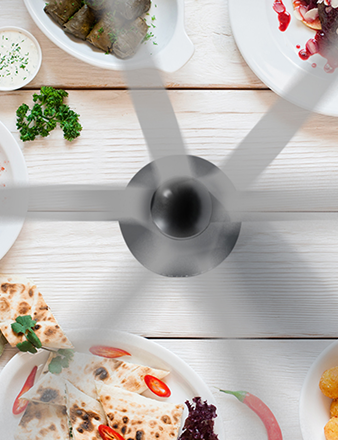
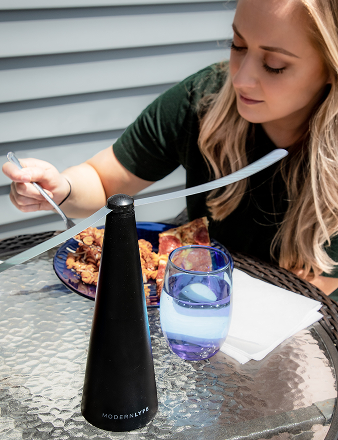
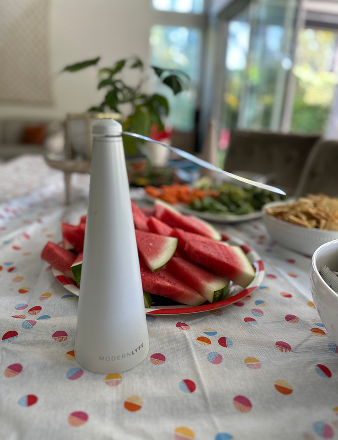
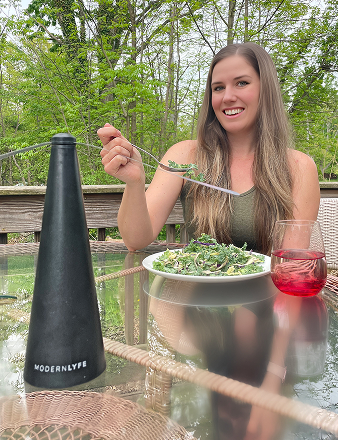
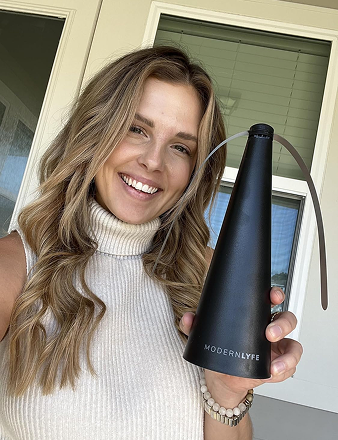
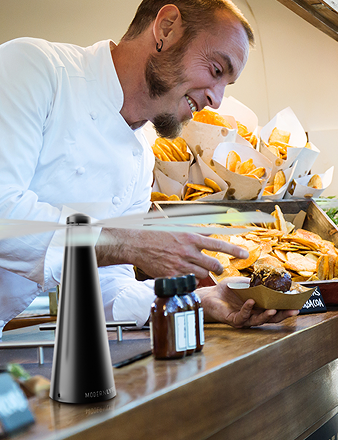
MODERN LYFE's battery-operated fly fans solve a specific operational problem without creating a new one. They're quiet, chemical-free, and visually unobtrusive. That combination matters. Many planners want better insect control, but they don't want aerosol sprays near food, loud devices near guests, or ugly equipment on a styled tablescape.
The product design is practical for hospitality use. Soft holographic blades create a deterrent zone, and the touch-stop safety feature helps when units are placed in active service areas. USB or AA battery power also gives you flexibility when outlets are limited.
Best placements and real-world limitations
These units work best where flies cluster around food and service points, not as a blanket solution for an entire property.
- Buffet lines: Place them at vulnerable food zones where covers aren't practical during service.
- Guest tables: They work well at intimate outdoor receptions and restaurant patio dining.
- Bars and dessert stations: High-sugar areas often need the extra protection.
- Catering prep exposure points: Use them where plated items wait briefly before service.
On-site note: Quiet hardware always beats reactive scrambling. Guests remember the table experience more than the workaround.
There are honest limits. A long buffet or multi-station event needs multiple units. AA batteries aren't included, so crews should prep power before load-in. And no fly fan replaces environmental prevention. For outdoor events, reducing standing water and maintaining landscaping remain useful non-chemical prevention measures, as outlined in this piece on mosquito management for outdoor events.
For restaurant owners, caterers, and wedding planners, MODERN LYFE fills a gap many software lists miss. It handles a real guest-comfort issue with a cleaner presentation than chemical sprays.
7. Splash

Splash is the tool I'd reach for when event marketing needs to look polished, branded, and repeatable. It's especially strong for field marketing teams, community event programs, roadshows, and branded dinner series where the invitation experience matters almost as much as the event itself.
If your event sits inside a larger marketing engine, Splash makes sense fast.
Brand consistency is the point
Splash gives teams strong control over event pages, RSVP forms, and email design. Distributed teams can work from templates instead of improvising every launch. That's useful when headquarters wants brand consistency but local teams need speed.
It also helps keep event data connected to the rest of the go-to-market stack through CRM and marketing automation integrations. That's often the difference between “we hosted an event” and “we can make use of the attendee data.”
Studies indicate that 39% of event planners identify attendee engagement as the most critical element of a successful live event, according to event planning tips from UCF. Splash supports that goal before guests even arrive by shaping a cleaner RSVP and communication experience.
Where it falls short is the same place many marketing-led tools do. If you need deep onsite operations, heavy badging, or enterprise logistics, you'll probably pair it with something else.
8. Whova

Whova is best when attendee communication and networking need to stay active before, during, and after the event. Association conferences, educational programs, summits, and multi-session meetings benefit most. The mobile app experience is the headline feature, and for many planners that's enough reason to look closely.
Agendas, speaker bios, announcements, live polling, messaging, and community boards all live in one attendee-facing environment.
Where Whova helps most
Whova reduces the need to juggle separate app, agenda, and community tools. For events with many sessions and sponsor touchpoints, that simplicity helps both attendees and staff. Sponsor and exhibitor hubs are also useful when partners want visibility and lead generation without a fragmented experience.
For venue Wi-Fi planning, reliable network design matters just as much as the app itself. If your event relies on attendee devices, guest access, and exhibitor connectivity, secure WPA2 authentication should be part of the technical conversation with the venue or IT partner.
Strong engagement tools don't matter if attendees can't connect, navigate the agenda, or receive updates on time.
Whova's biggest limitation is budget alignment. The app may feel attendee-friendly, but the organizer investment can be significant depending on event size and modules. It's worth it for communication-heavy conferences. It's usually overkill for simpler social events.
9. zkipster

zkipster is a premium tool for invitation-only events where front-of-house needs to feel flawless. Brand dinners, VIP receptions, PR launches, investor gatherings, and celebrity-attended events all fit the profile. In these rooms, check-in isn't just operational. It's part of the guest experience.
A weak arrival process changes the tone of the event immediately.
Why arrival experience matters more than planners think
zkipster is optimized for guest list control, RSVP management, QR-based check-in, and seating. Its interface is clean, and staff can move quickly without making the door feel chaotic. That's valuable when hosts care about discretion, accuracy, and pacing.
This is also where permits and compliance conversations need to happen early. Invitation-only doesn't automatically mean low-risk or exempt. Private events can still trigger venue rules, alcohol permissions, amplified sound restrictions, valet coordination needs, or neighborhood notice requirements depending on the jurisdiction.
A good permit workflow usually includes:
- Venue confirmation: Ask what licenses and approvals the venue already holds, and what shifts to the organizer.
- Local authority check: Confirm timelines for noise, street use, tents, food service, and alcohol service approvals.
- Operational alignment: Make sure security, guest list control, and check-in procedures match any permit conditions.
zkipster won't replace your compliance planning, but it does support the kind of controlled entry that high-touch events need. The trade-off is price. It's aimed at the premium end of the market, and smaller teams may not need that level of polish.
10. Stova
Stova makes the most sense for organizations managing an event portfolio rather than a single event. It's designed to support in-person, virtual, and hybrid programs in one framework, which is useful when different business units run different formats but leadership still wants consistency.
That portfolio view is where Stova separates itself.
Best for complex program oversight
Registration, website building, mobile app functions, onsite services, analytics, and managed services all sit under one umbrella. Lean teams often overlook the value of managed services until they're trying to launch multiple events with limited internal staff. In that situation, outside execution support can be the difference between a controlled rollout and an overloaded team.
The broader software category keeps growing. One market analysis values the global event management software market at USD 16.0 billion in 2025 and projects it to reach USD 39.6 billion by 2033, according to Grand View Research's event management software market report. That growth reflects how central digital infrastructure has become for event delivery.
Where it fits in a real tech stack
Stova is not the first tool I'd recommend for a small fundraiser or one-night dinner. It is the kind of system I'd evaluate for annual conference portfolios, enterprise field events, and hybrid programs that need shared reporting and repeatable workflows. If your team is still defining process, start simpler. If your team already has process and needs scale, Stova is worth a serious look.
For planners tightening their operational systems, this event coordinator checklist template is a useful companion for mapping responsibilities beyond the software itself.
Top 10 Event Planning Tools Comparison
A useful event stack starts with function. Registration, marketing, floor plans, check-in, venue sales, attendee engagement, and guest comfort rarely belong in one tool, and forcing them into one system usually creates workarounds later. This comparison is easier to use if you read it by event job, not just by brand name.
| Product / Purpose | Top Features & USPs (✨) | UX / Quality (★) | Price / Value (💰) | Target Audience (👥) |
|---|---|---|---|---|
| Cvent | ✨ Advanced registration, OnArrival check‑in & badges, deep multi‑event analytics | ★★★★☆ enterprise‑grade, detailed workflows | 💰💰💰 Quote‑based. High ROI for large programs | 👥 Hotels, restaurant groups, large corporate events |
| Eventbrite | ✨ Fast self‑serve ticketing, built‑in discovery & promos | ★★★★☆ very easy for organizers and attendees | 💰💰 Per‑ticket fees. Great for casual and public events | 👥 Pop‑ups, festivals, workshops, public events |
| Bizzabo | ✨ Onsite Command app, exhibitor lead capture, integrated marketing | ★★★★☆ designed for experiential teams | 💰💰💰 Mid‑market and enterprise pricing | 👥 Conferences, brand experiences, repeatable programs |
| Social Tables (Cvent Diagramming) | ✨ Scaled floor plans, seating + meal tracking, 3D walkthroughs | ★★★★☆ improves ops and collaboration | 💰💰 Free tier available. Paid plans add advanced 3D and integrations | 👥 Venues, caterers, wedding planners |
| Tripleseat | ✨ Hospitality CRM: leads → proposals → BEOs → payments | ★★★★☆ purpose‑built for venue workflows | 💰💰 Quote‑based. Strong fit for teams driving group sales | 👥 Restaurants, hotels, unique venues |
| 🏆 MODERN LYFE | ✨ Quiet battery/USB fly fans, touch‑stop safety, sleek décor‑friendly design | ★★★★☆ effective, low‑noise, low‑maintenance | 💰💰 Affordable, promos and flexible payment. Quick shipping | 👥 Restaurants, hotels, caterers, outdoor receptions, hosts |
| Splash | ✨ Branded event pages, email, ROI analytics, CRM integrations | ★★★★☆ excellent design control for marketers | 💰💰💰 Enterprise focus. Contact sales for pricing | 👥 Field marketing, roadshows, distributed teams |
| Whova | ✨ Mobile app for engagement, networking, live polling | ★★★★☆ strong attendee adoption and engagement | 💰💰 Quote‑based by event size and modules | 👥 Conferences, associations, educational events |
| zkipster | ✨ VIP guest management, fast QR check‑in, seating builder | ★★★★★ premium reliability for VIP arrivals | 💰💰💰 Premium pricing for high‑touch events | 👥 PR firms, luxury brands, invitation‑only events |
| Stova | ✨ Unified reg, mobile app, analytics + managed services option | ★★★★☆ single vendor for complex portfolios | 💰💰💰 Custom pricing. Suited to large programs | 👥 Enterprise portfolios, hybrid, in‑person, and virtual events |
A few practical reading notes help here.
Cvent, Bizzabo, and Stova sit in the same buying conversation for many corporate teams, but they solve scale differently. Cvent tends to suit organizations with layered approval processes, venue sourcing needs, and repeated event operations across departments. Bizzabo often fits teams that care as much about audience growth and sponsor experience as registration. Stova makes more sense once portfolio standardization and service support matter more than fast setup.
Eventbrite and Splash are not direct substitutes either. Eventbrite works best when speed, public access, and low setup friction matter most. Splash is stronger when brand control, campaign design, and CRM connection sit closer to the center of the event's job.
Social Tables and zkipster cover two operational moments that software buyers often underestimate. One prevents room-layout mistakes before load-in. The other protects the arrival experience at the door. Both can be worth the spend even if they never appear in the original registration platform budget.
Tripleseat also deserves to be judged on hospitality terms, not generic event-tech terms. Venue sales teams need lead tracking, proposals, BEO workflows, and payment visibility in one place. A generic registration tool rarely handles that rhythm well.
MODERN LYFE belongs in this comparison for a different reason. Guest comfort hardware affects outdoor dining events, tented receptions, buffet protection, and service flow in ways software cannot fix once guests are onsite. For planners handling permits, food service, and warm-weather setups, practical equipment choices matter just as much as the platform stack.
Build a Smarter Event, Not a Bigger Toolbox
A familiar event-day failure looks like this. Registration is live in one platform, seating changes are buried in a PDF, the venue manager is texting updates, and the check-in team is asking which guest list is current. The problem usually is not a lack of tools. It is a stack that was never built around the actual job the event needs to do.
Start by mapping resources to event function, not by buying the platform with the longest feature list. A public paid event may need fast ticketing and broad reach first. A sponsor-heavy conference may need stronger registration controls, audience data, and session management. A private dinner or gala may need tighter front-of-house handling than marketing automation. Hospitality sales teams often need proposal flow, banquet event orders, and payment visibility before they need attendee networking features.
That is the difference between a toolkit and a pile of subscriptions.
The most useful event planning resources usually fall into four groups. Core event management suites such as Cvent, Bizzabo, and Stova run registration, agenda, reporting, and portfolio oversight. Marketing and guest acquisition tools such as Eventbrite and Splash help fill the room or protect brand presentation. Operational tools such as Social Tables and zkipster reduce mistakes in room layout and check-in. On-site hardware and service items support comfort, food protection, staffing, power, and signage once guests arrive.
Permits belong in that system too. Outdoor service, alcohol, amplified sound, tenting, temporary structures, street use, and food handling often trigger separate approvals, and each one affects layout, staffing, and load-in timing. If permit requirements are discovered after the floor plan is set or invites are out, the fix is usually expensive. Sometimes it is not possible at all.
Safety and accessibility need the same early treatment. This guidance on safety planning for events recommends building risk assessment well before event day and revisiting it as conditions change. The event safety management guide makes a similar point from an operations angle. Crowd flow, exit routes, and placement decisions should be handled during planning, not during setup.
Accessibility decisions also shape the stack. The toolkit on accessible and welcoming events notes that accessibility is often left out of early budgets even though it affects venue choice, floor plans, communications, staffing, and vendor scope. In practice, that means captioning, interpreters, mobility access, quiet space, signage, and seating plans should be scoped before contracts harden.
As noted earlier, the event business continues to create steady demand for planners, and the work is becoming more specialized. That shows up in buying decisions. General-purpose tools rarely cover venue sales, invitation-only arrivals, sponsor reporting, branded guest communications, room diagramming, and outdoor guest comfort equally well.
A stronger stack is usually smaller than teams expect. Pick one system to own the operational record. Add a second tool only when it solves a clear gap, such as branded marketing pages, diagramming, venue sales workflow, or VIP check-in. Then budget for the practical items software cannot solve onsite: radios, charging, print backups, power distribution, weather coverage, accessibility support, and food-area protection.
If outdoor dining, buffet service, patio events, weddings, or catered gatherings are part of your workload, MODERN LYFE fits into that last category. Their fly fans address a specific guest-comfort and food-service issue with a quiet, chemical-free setup that works for restaurants, hotels, caterers, and private events where appearance still matters.
Use the failure points on event day to decide where money goes first. Registration delays call for a better intake and check-in process. Service bottlenecks often trace back to layout. Confused guests usually point to weak communications, weak signage, or both. Food and comfort complaints can come down to equipment choices that never made it into the planning conversation.
Build around function first. The toolbox gets smaller, and the event runs better.